By: Nick Rains
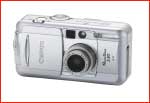
I had been looking for a compact camera for a while and wanted to get a digital one for all the usual reasons‚ cheap to run, instant results and so on. I settled on the 3 megapixelCanon S30as it seemed to be the best in its class, and the review atdpreview.comwas very favourable.
When I took the box home (and unpacked the vast array of cables) I was delighted to find a very solid, well made little camera. It has good heft, a nice brushed aluminum look, and is very compact indeed. The whole package is a delight to use. Well done Canon.
Image quality was a big surprise for a compact 3mp camera. The RAW files that the S30 produces, when carefully sharpened and up-rezzed, are capable of being printed on a good inkjet at over A4 easily, and A3 with a tiny bit of that "digital" look in the very fine details. Colour is very crisp and the files are very clean after a quick tweak in Levels.
I have no way of directly comparing this camera to aCanon D30, but having borrowed one once and kept the resulting files, I can say that while not of the same quality level S30 files are better than you might imagine‚ at one quarter the price.
OK, so it’s a good compact‚ what does this have to do with serious landscape photography? Well, I’m glad you asked.
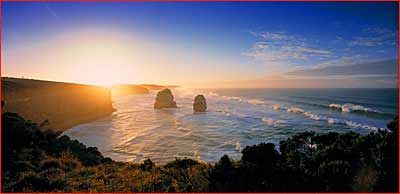 12 Apostles at Dawn, Victoria
Ebony, 100mm Schneider lens, Fuji 100F, 1/4 Sec @F22
A Histogram in Your Pocket
Built into the display function of some of the better digital compacts is a histogram display, just like the one inPhotoshopor a larger digital SLRs. I wondered if that could be used to measure the brightness range of a scene and to pick the best exposure for when shooting with a large format camera.
After much testing‚ not very scientific but the results seem clear ‚ I found that the camera can record a range of 7-8 stops with about 1% grayscale (K) density at plus 2.5 stops and about 98% grayscale (K) density at about minus 5 stops. That’s pretty much the same as off aFuji Provia 100Ftransparency scanned with a good scanner. It’s possible that the S30 can record a little more highlight detail than 100F, and the dark limit seems to be the same as from scanned film.
The S30’s light meter also agrees, to within 1/3 stop, with myCanon EOS3orA2which I already use for light metering when I use myEbony 4×5camera.
Consequently, you can use the S30 a bit like a digitalPolaroidcamera, not only to visualize the scene but also to measure the best exposure. I meter the scene with the S30 and shoot a frame at the recommended exposure. A quick look at the resultingLevelsdisplay will tell me if there are parts of the scene that are too bright, or it might show that I have a good range of tones recorded at that exposure. It may be that there are no tones above the quarter tones in which case I can open up a bit and effectively slide the displayed tonal range up the scale to use the full highlight range and open up the shadows a bit.
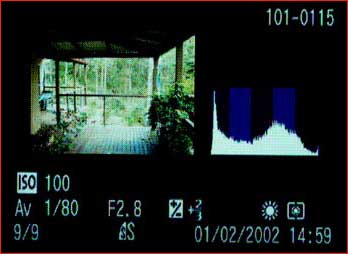
This screenshot off the camera shows a scene with a good range of tones that will record well on film. The full exposure details are shown to remind you what to set on the "’real camera".
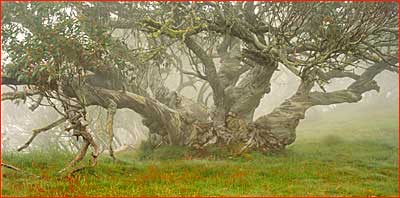 Snow Gum, Victorian High Country
Ebony, 6×12, 100mm Schneider lens, Fuji 100F, 1/2 Sec @F16
This technique works fine with the S30‚ your mileage may vary with other compacts. It’s important that the sensitivity range of the camera is close to that of your film, that the meter agrees with other familiar light metering methods and that the camera itself has a levels display.
One last thing, the S30 has a voice annotation feature so you can shoot a frame, make verbal notes and then have both visual and audio references (including exposure details) when you get the film back from the lab.
So, whilst I normally lug around myEOS3with a 28-70L zoom to act as a light meter when shooting 6x12s on myEbony, I may soon be using this new bit of technology to save weight and also give me more information about my exposures.
Copyright 2002‚ Nick Rains
www.nickrains.com
Fine Art Landscape Photography Gallery
"Enjoy the wonder of Australia’s fabulous scenery"

Michael Reichmann is the founder of the Luminous Landscape. Michael passed away in May 2016. Since its inception in 1999 LuLa has become the world's largest site devoted to the art, craft, and technology of photography. Each month more than one million people from every country on the globe visit LuLa.
You May Also Enjoy...
Epson Exhibition Fiber Paper
BackgroundOne of the pleasures of digital printing is the wide number of papers available. Compared to the days of the chemical darkroom we have an
