



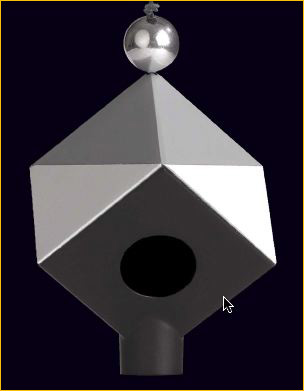



Remember the Kodak 18% gray card? If you are living in the world of digital, and I hope that you are, take the gray card and put it in a drawer andfuhgetabboutit. Enter the age of digital, raw processing and the Datacolor SpyderCube.
Datacolor has recently announced their SpyderCube, which is much more than a product that can help you adjust your white balance. The SpyderCube allows you quickly adjust exposure, as well as white balance, in the editing software of your choice. The SpyderCube is a multi-sided device that can be mounted on a tripod or dangled from your hand.
The SpyderCube will likely be compared to a gray card, and here are a few quick differences:
The SpyderCube has 6 different surfaces for taking readings, as opposed to only one.
The SpyderCube has 2 different gray surfaces, which will help identify the white balance for the primary and secondary light sources. For example, you can identify both the ambient light in a room, as well as an artificial light source (such as an off-camera flash).
There is a white surface, as well as two black surfaces. The white surface corresponds to your white (brightest) point, the outside black corresponds to your deep shadows and there is a black trap, which is your absolute black.
The black trap is a unique capability of the SpyderCube, providing an absolute black point reference even in direct bright sunlight.
There is also a chrome ball on the top of the unit, which is your spectral reflection.
The beauty is that the product works well for both studio and location photographers.
The key to using the SpyderCube is making sure that you face the unit towards the camera. You can quickly grab a shot of the SpyderCube in your scene, then remove and shoot until the light changes. If the light changes dramatically, just take out the SpyderCube and take another quick shot of it in the same light as your scene.
Here you can see an image that is underexposed slightly and has a white balance that is too blue. With a very quick correction in Adobe Photoshop Lightroom, I selected the gray on the left-hand side of the SpyderCube as my white balance point, and the white, black and absolute black reference surfaces made easy work of my processing settings in Lightroom. With a couple of quick changes to the brightness and contrast sliders, the image turned into this:
Is something like the SpyderCube really necessary? No, of course not. But if you are looking for a tool to help you optimize both your exposure and white balance quickly, its moderate cost as compared with a simple gray card is well worthwhile.
June, 2009


Elevate Your Vision


Read this story and all the best stories on The Luminous Landscape
The author has made this story available to Luminous Landscape members only. Upgrade to get instant access to this story and other benefits available only to members.
Why choose us?
Luminous-Landscape is a membership site. Our website contains over 5300 articles on almost every topic, camera, lens and printer you can imagine. Our membership model is simple, just $2 a month ($24.00 USD a year). This $24 gains you access to a wealth of information including all our past and future video tutorials on such topics as Lightroom, Capture One, Printing, file management and dozens of interviews and travel videos.
- New Articles every few days
- All original content found nowhere else on the web
- No Pop Up Google Sense ads – Our advertisers are photo related
- Download/stream video to any device
- NEW videos monthly
- Top well-known photographer contributors
- Posts from industry leaders
- Speciality Photography Workshops
- Mobile device scalable
- Exclusive video interviews
- Special vendor offers for members
- Hands On Product reviews
- FREE – User Forum. One of the most read user forums on the internet
- Access to our community Buy and Sell pages; for members only.
You may also like