


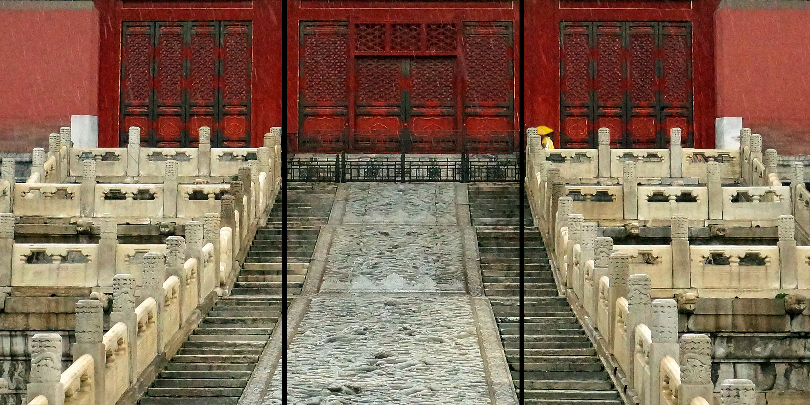


This is a response to Alain Briot’s series of articles on “Triptychs,” the first of which is dated July 12, 2017. Alain writes interestingly and helpfully about creating photographic triptychs. He lists quite a number of reasons why you might want to create such works, such as motivating yourself to create more artistic images, using up more of your images in one presentation format, facilitating the creation of more abstract works, and so on. Those are all excellent reasons, and I’d like to add yet another one, one that prompted me to create triptychs even before having read Alain’s article. That reason is size: you can create and display images that are bigger than your printer will print.

Here’s what I mean. A couple of years ago, my printer’s maximum print size was 13 by 19 inches (today, with my Epson SC-P800, it’s 17 by 22 inches, but the same principle applies). I was entering a photography show at my local art center one day and wanted to create a physically large image, bigger than my 13 by 19 maximum. Ordinarily, in this circumstance, one would work with a custom lab (or even with Costco, which does a pretty good job of photo printing) to get the desired size. But I was impatient, and I was also working with an image (which became “Tree Triptych”) that was quite wide relative to its height: not quite a panorama, but with a wider aspect ratio than my usual prints and hence not a standard photo size. Suddenly it hit me: the image rather nicely lent itself to three groupings, where each grouping would be an individual, portrait mode print of 13 by 19. Accordingly, I divided the image into thirds in PS, did some editing to make each of the three parts capable of standing alone (because that seemed like the right thing to do, even though I wasn’t planning to ever have them stand alone), and printed each separately. This gave me three images, each 13 wide by 19 high, that when placed next to each other resulted in a triptych of 39 inches wide by 19 inches high. Perfect!

At that time, I was typically mounting images onto a Gatorfoam product, called “CodaMount Standouts,” which are produced in many standard photo sizes with adhesive backing by the Coda company (see www.codamount.com, a company with which I have no affiliation). These “Standout” mounts result in a sturdy, three-quarters-inch thick backing with no frame or matte. I mounted each of the three “Tree Triptych” images onto separate 13 by 19 Standouts (which are actually about an eighth of an inch smaller than 13 by 19, to allow for a utility knife to trim the prints’ edges to be precisely flush with the backing). I then tried to submit these three physically separate mounted prints to the gallery, asking for them to be hung side by side, close together. The gallery wouldn’t do that, though: they insisted that the three had to be physically connected as a single work, ready to be hung with one single wire on the back.

So I glued the three mounts (which, like thick foam core, are both rigid and very light weight) onto a single large sheet of 3/16ths actual foam core to get them aligned and grouped together. I decided that it wouldn’t look right if I glued them butt up against each other: there would still be an awkward-looking, not-supposed-to-be-visible but still obviously visible, line between them. So I left about a one-eighth inch gap between them, which was enough to look deliberate, but still cause the three images to read quite easily as a single triptych.

Then I glued several strips of wood, roughly three-fourths of an inch wide by half an inch deep, in a rectangular grid onto the back. Other wood strip sizes would probably work equally well; I just had this size on hand. This grid provided further support for the whole thing, keeping the three mounts pretty stiffly in alignment, and it also provided a good place to screw in the eye-hooks for the hanging wire. Once I put in the eye hooks and wire, I had a single physical work ready for presentation and the gallery readily hung it up for display.

That was a couple of years ago, and the piece is now back with me (“What??” you ask: a work this beautiful didn’t SELL??). More importantly, it has held up: no warping or other distortions, no glue drying up and blowing away, etc. etc. It seems to have worked out pretty well. I don’t vouch for the archival qualities of the Coda products, and neither does the company: the Standout mounts were designed for trade show mounting of photographs, and the adhesive wasn’t designed to be archival. But I have mounted several other photographs onto Coda Standout mounts as long as five or more years ago, and they have not visibly faded. Besides, one reason to do this sort of mounting is that it’s much cheaper than matting and framing, and you can sell the mounted images at a much lower price; I don’t describe the mounts to buyers as being archival, and at relatively low prices, buyers aren’t looking for that quality anyway.
Thanks to Alain Briot for all his suggestions. In my experience also, both diptychs and triptychs are useful and fun ways to present images, and most importantly for me, they also permit the creation of an overall image that exceeds the size of what a printer can print as a single image. Mounting multiple images with frames and matte openings as Alain shows creates an excellent and classic-looking presentation, but you can also mount multiple images on Gatorfoam or the equivalent products with no frame at all. This type of mounting allows the images to be displayed as close together as you like, which results in a presentation that easily reads as a single image. Try it!
Trotter Hardy
September 2017
Elevate Your Vision


Read this story and all the best stories on The Luminous Landscape
The author has made this story available to Luminous Landscape members only. Upgrade to get instant access to this story and other benefits available only to members.
Why choose us?
Luminous-Landscape is a membership site. Our website contains over 5300 articles on almost every topic, camera, lens and printer you can imagine. Our membership model is simple, just $2 a month ($24.00 USD a year). This $24 gains you access to a wealth of information including all our past and future video tutorials on such topics as Lightroom, Capture One, Printing, file management and dozens of interviews and travel videos.
- New Articles every few days
- All original content found nowhere else on the web
- No Pop Up Google Sense ads – Our advertisers are photo related
- Download/stream video to any device
- NEW videos monthly
- Top well-known photographer contributors
- Posts from industry leaders
- Speciality Photography Workshops
- Mobile device scalable
- Exclusive video interviews
- Special vendor offers for members
- Hands On Product reviews
- FREE – User Forum. One of the most read user forums on the internet
- Access to our community Buy and Sell pages; for members only.
You may also like