




ColorByte Software and its key product – ImagePrint – have been around for a long time and our dear departed colleague Kevin Raber never ceased to sing its praises as an all-round printing solution, plus some. I had seen several demonstrations in the past and was suitably impressed with its scope and capabilities, but until recently never quite saw the point – relative to my needs – of spending money beyond the conventional workflow to achieve the results I wanted, and quite frankly, up to the time ImagePrint came out with its RED version, buying a license was (and is) a chunk of change – but a lot capability and good service comes with it.
Why do I say “until recently” – what’s changed? What’s changed, not so much in its existence but in its degree, is the extent of annoying colour management disconnects that pop-up in the printing chain, which starts from our editing applications and proceeds through the Mac operating system and then the printer driver in not so transparent ways to the under-initiated, which is most of us. These disconnects usually arise upon recent upgrades, be it of Adobe applications, or MacOS or the printer driver. They usually get resolved, but it can take time, during which I have observed a rising plethora of complaints on the usual forums, particularly about broken colour management.
As my readers know, I’m quite fussy about the predictability of what I see on my colour-managed display coming out of my colour-managed printer, and I’m not prone to upgrading anything until I see the need for it, but once doing so, I want to be certain that my printing workflow will produce as reliably as usual. In that, I have every reason to believe I am not alone.
The nice thing about a RIP (Raster Image Processor) is that it works directly from image file to print bypassing in part or in full Lightroom, Photoshop, Mac’s CMM (color management module) and the printer driver. So, if anything messes up with colour management, it’s a one-stop shop to figure it out and fix it or get it fixed. No more buck-passing of blame and accountability from one guy to the next not really knowing for sure who is responsible for what line of code that may be causing issues – and the often annoying realities of support relegated to “community forums” . Hence, in the current environment ImagePrint seemed like a potentially attractive solution worth a second look.
With the truly helpful cooperation of the folks at ColorByte, for which I am most grateful, I downloaded both the Black and Red versions of ImagePrint and engaged in a full exercise of testing these applications in Epson SC-P5000 and SC-P5370 printers. This article is not a comprehensive review of ImagePrint, because Kevin Raber has done such an excellent job of this (https://luminous-landscape.com/introduction-to-imageprint-pxl-print-series/), that the most sensible thing for me to do here is to refer you to this discussion and then focus my attention on the one thing that I haven’t seen covered with analytic rigour on the Internet, being the accuracy with which it makes prints. So first a word about accuracy, then about the differences between ImagePrint BLACK (hereafter IPB) and ImagePrint RED (hereafter IPR), then my testing results.
Accuracy in this context means one thing: the dE (2000) between the L*a*b* values of colours in the image file and those for what are supposed to be the same colours on paper. The smaller the dE the more accurate the printing. But this needs context for its interpretation, which I provided most recently in my article on the Epson P7370 printer, but I’ll briefly review here for convenience.
The calculation of a dE value is a mathematical representation of a “sensation” arising from perceived colour differences, the “E” part representing the German word “Empfindung”, meaning “sensation” or “perception”, and “d” being “difference” – so “difference of perception”. The most recent mathematical version of “dE” is from the year 2000 and called dE(2000). I found information (augmented after the semi-colons with my descriptions) about how to relate a scale of dE(2000) values to the extent of the “Empfindung”:
0-1: Imperceptible, therefore non-disturbing color difference to the human eye.
1-3: Perceptible color difference with close observation; minimally disturbing.
3-5: Obvious color difference; therefore, more disturbing.
5-10: Significant color difference; therefore, even more disturbing.
10+: Very significant color difference;……will send you to the shrink (that’s not official).
There isn’t a single simple formula for calculating these dE (2000) values. The math became a bit complex over the years as the research and understanding of these perceptual differences advanced, such that it now requires a spreadsheet using 39 columns to calculate these values, but properly configured, it works.
Well, OK, it’s sort of “nerdy” stuff, but if your printing system were systematically returning dE(2000) values of 3 or more, you’d see it and you likely wouldn’t be happy. So, I test for that in ways I’ve described in several previous articles available on this website.
Turning to differences between IPB and IPR, the place to see them all in detail is here: https://www.colorbytesoftware.com/Side-by-Side-comparison.shtml. My focus is on differences of colour management, which in this context means profiles and application workflow. IPR costs USD 399, and IPB (for 17” printers) is USD 895 at time of writing. IPB comes with an inventory of 25,000 downloadable printer/paper profiles and a free profile generation service if you happen to be using a paper not already in their inventory, whereas IPR does not. The other major difference from a colour management perspective is that IPR uses the printer manufacturer’s driver (which one accesses through IP), whereas IPB does not – it is totally self-contained. (So, if you’ve been accustomed to swearing at your Epson or Canon printer driver and you switch to IPB, you can now start swearing at IPB, but there’s nothing to really to swear about, because unlike OEM driver GUIs for Mac, it’s quite straightforward.) For both IPR and IPB we can make our own custom profiles and integrate them into the IP printing workflow. I’ve done this as well as tested IP’s canned profiles.
Testing the colour-managed workflow with IP:
Step One was to establish a benchmark against which to evaluate the results from ImagePrint, so I ran a re-test of the profile I made for Epson Legacy Platine paper in the Epson SC-P5000 printer back in late 2022. At the time I made that profile and tested it, its average dE(2000) result was 0.49 and the worst colour had dE(2000) of 1.22 (Figure 1). Any average below 1.0 is excellent, so this one was stellar. Notice the Grayscale, where Lightness accuracy and lack of hue bias in the a* and b* channels are outstanding. (I’ve provided a guide to reading these Figures at the end of the article.)
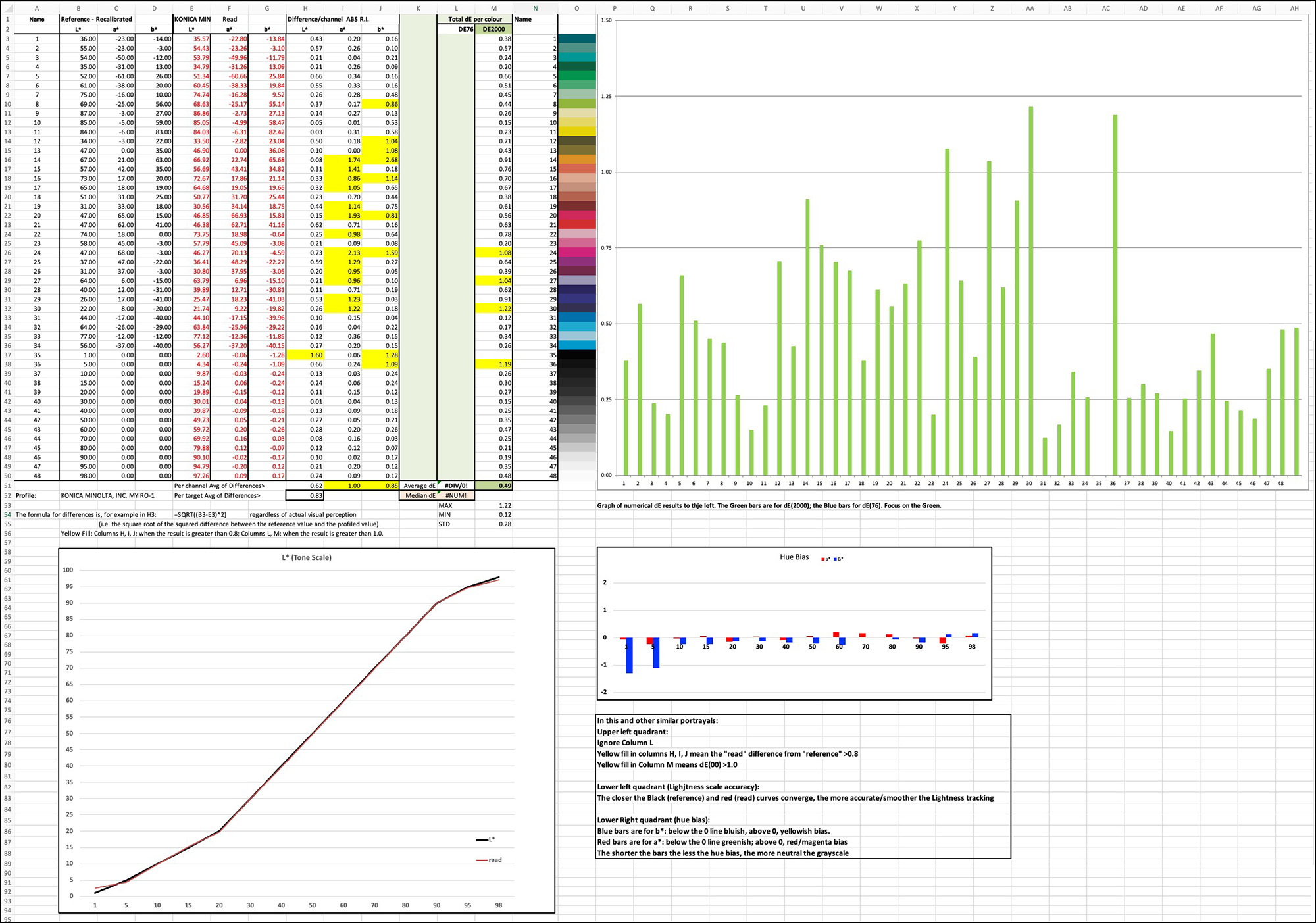
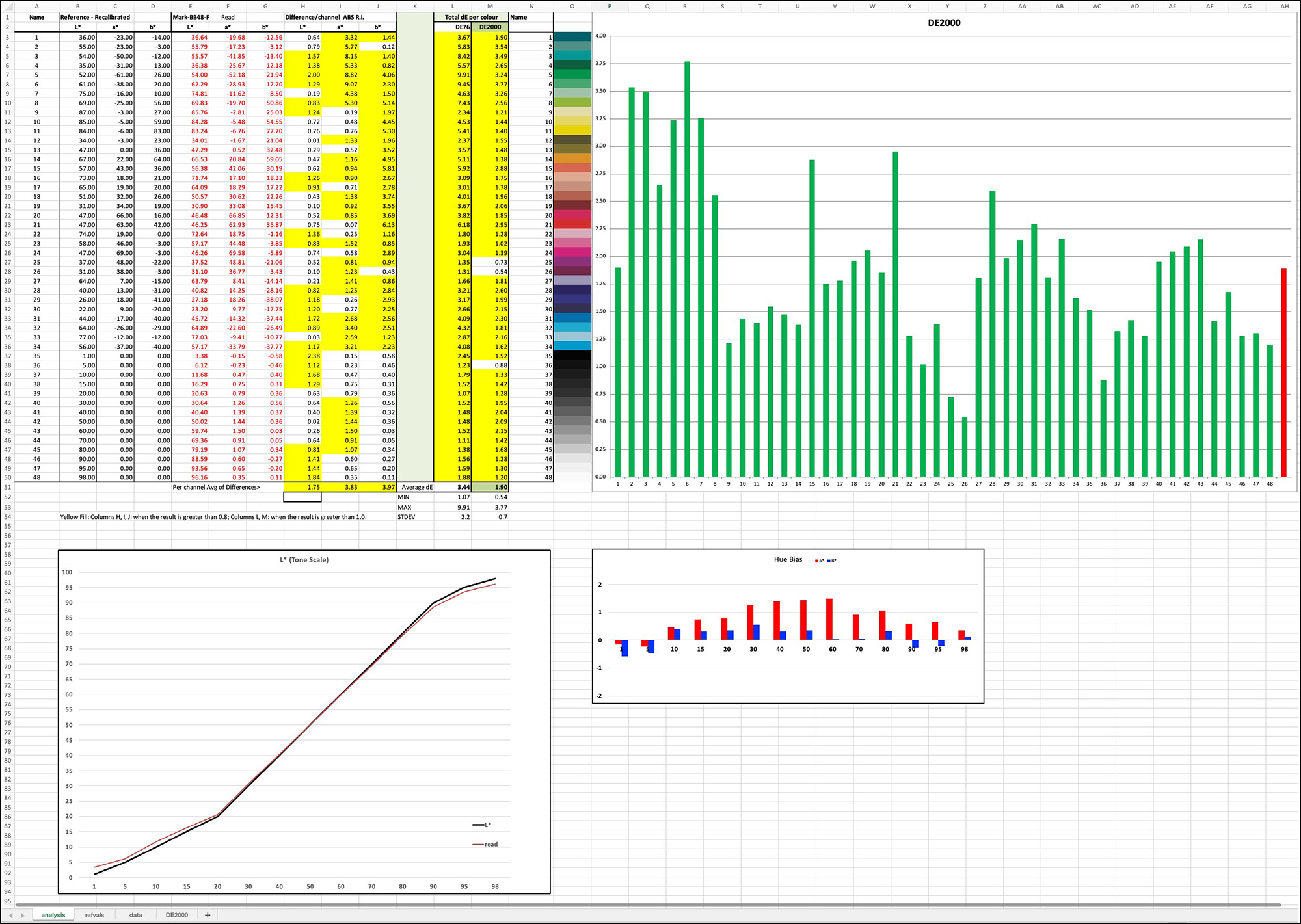
Fast forward to November 2025, retesting the same profile from 2022 using the same test chart for the same paper in the same printer, average dE(2000) now stood at 1.90 and the worst colour 3.77 (Figure 2). For the grayscale, Lightness accuracy remained very good, but there is more hue bias, there being a slightly warm emphasis in the mid-tones on the green-magenta axis. This is no longer a profile I was very happy with, but I can’t explain the reasons for the shift in test outcomes. The only two input change factors that come to mind are the upgrade of Photoshop (used for printing the test target) from the 2022 to 2024 version, and the fact that the inks in the printer would have aged or been changed over that period.
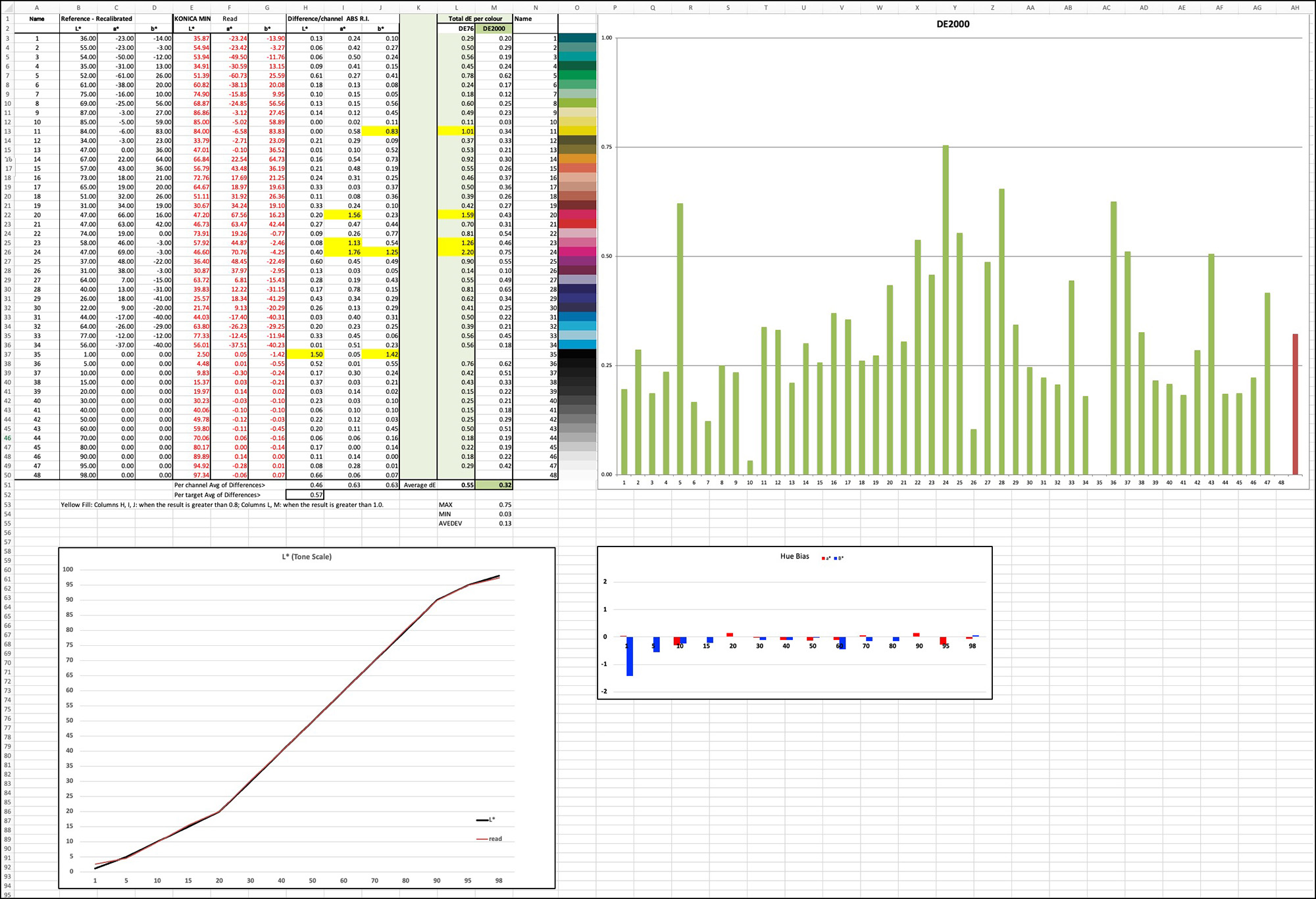
So, I promptly remade this profile, tested it, and this time it tested as one of the best profiles I’ve ever made, average dE(2000) being only 0.32, and the worst colour 0.75 (Figure 3), with excellent quality of the grayscale. It doesn’t get better than this. So, it confirmed to me that my profiling and testing with this printer remains capable of producing excellent results, remembering that the printer is now about 8 years old – it was worth reconfirming.
The importance of this exercise was to reveal that even with closed-loop profiling and testing on the same printer with the same materials, the quality of the results from the same profile can change over time, so reason enough to expect that when testing 3rd party profiles made with printers other than the testing printer at different times under different conditions, the highest accuracy of results should not be expected. That would only come with timely custom profiling. As well, I must emphasize there is a range of several dE (2000) values over which one would not be disturbed by such differences in real-world prints.
So, the two questions that needed to be addressed in this context are: (1) would using ImagePrint profiles offered with the Black version provide sufficient accuracy for acceptable printing results, and (2) is ImagePrint a reliable application from which to make the highest quality custom profiles? Those are the two questions the remainder of my research with ImagePrint focused on, and about which I report just below. Most of this research was done using Epson Ultra Premium Photo Paper Luster (UPPPL) in Epson P5000 and P5370 printers. The paper contains OBAs, so the appropriate Measurement Condition to use for making and testing profiles is M1.
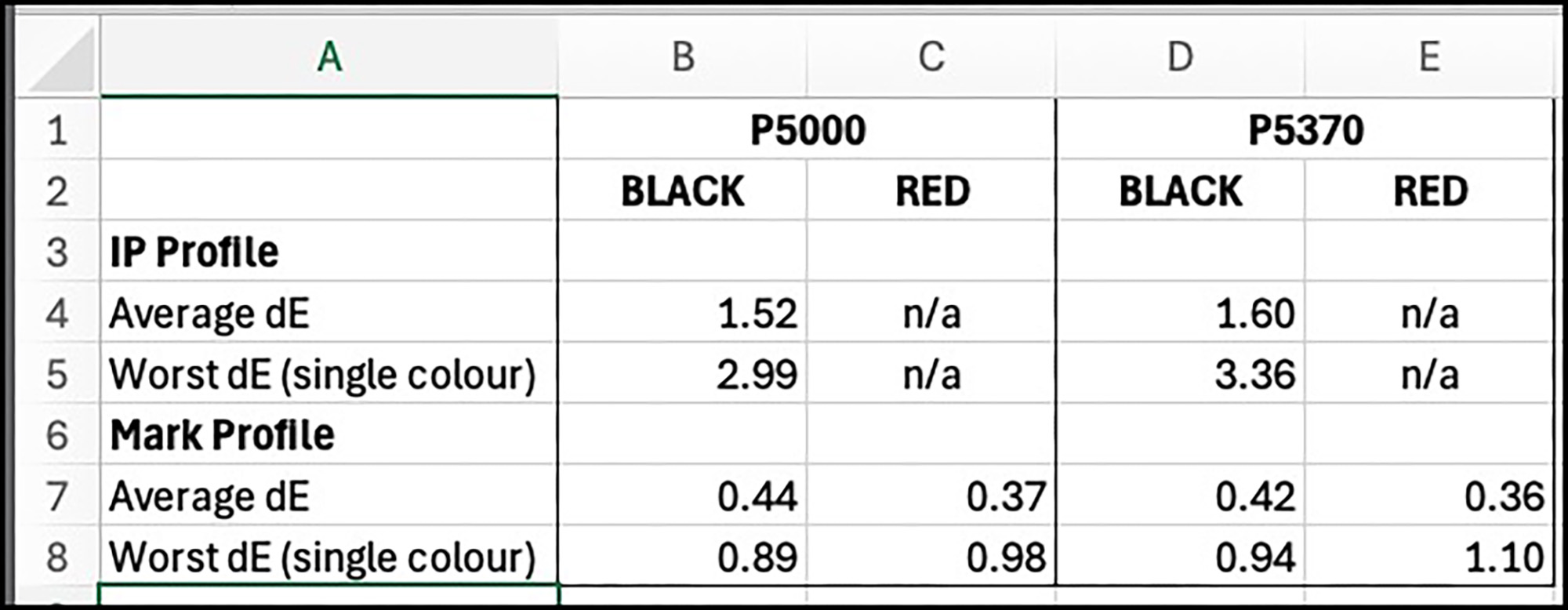
Figure 4 provides a capsule summary of the results obtained from both custom profiling and testing the provided ImagePrint profiles. Please do not stop reading after looking at this data, because there is context and interpretation needed to know what these numbers mean. Behind each of the average dE numbers in Figure 4 there is a layout of the detailed results in Figures 5 to 10 at the end of this write-up.
The custom profiling results in rows 7 and 8 of Figure 4 are all excellent. The average dE(2000) values are all well below 1.0 and the worst colours are slightly below 1.0 with one exception that is moderately above. This provides confidence that whether using IPB or IPR one can generate custom profiles within ImagePrint and expect excellent results using them, provided the profiling is implemented correctly, i.e. turning off colour management properly within ImagePrint for printing the profiling targets and using high-quality equipment to read the target prints and generate the profiles.
The results from testing IPB proprietary profiles (none are provided for IPR) are within the range one expects when the profiles and the testing of the profiles are done from different printers under printing conditions which cannot be identical in every respect. The data are similar if not a bit better than results I have observed in the past testing OEM profiles from my printers. This gives me confidence that one can rely on ImagePrint profiles to help deliver fine results. I’ll add to this, from my experience dealing with the company during the preparation of this work, that if you notice anything “wonky” from using their profiles in IPB, at least for the first year after buying a license, they will help analyze your issues, and if they determine their profile(s) need updating, they will do so. This is a company that takes its customers seriously and provides US-based tech support directly between the client and themselves – no chat forums. Colorbyte advises that with IPB, if a customer suspects that a profile is not performing as it should, it could be for a number of reasons, but “We do help the user get to the bottom of the issue and if needed we would rebuild the profile. ……We are still very accessible to the user and try our best to make owning our product a pleasant experience.”
In conclusion, either the R.E.D. or Black versions are worthy of your consideration for relatively trouble-free printing and the other features the applications provide, as discussed in the above referenced video between Kevin Raber and John Pannozzo.
Annex – Detailed Results of Printing Performance Analysis
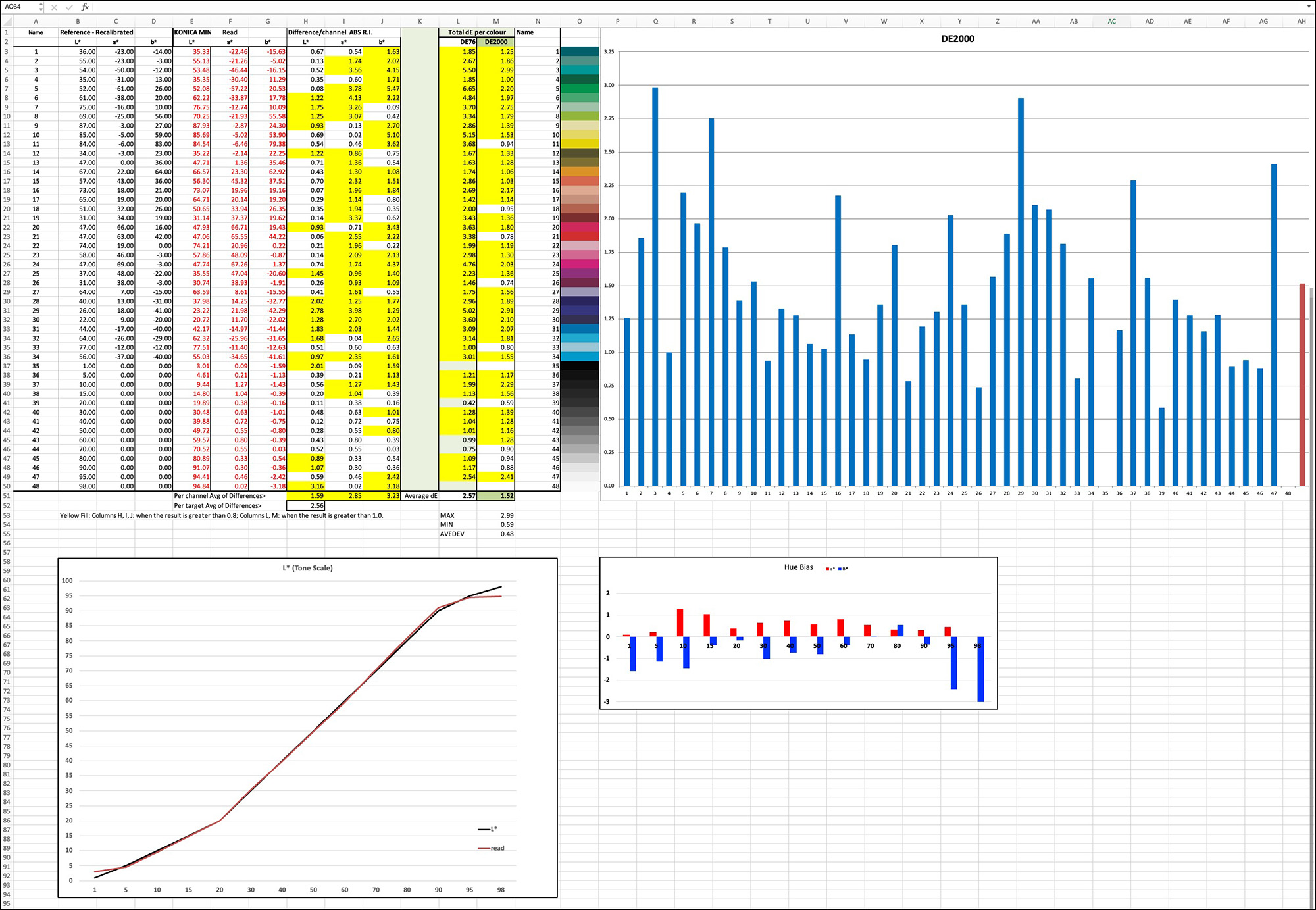
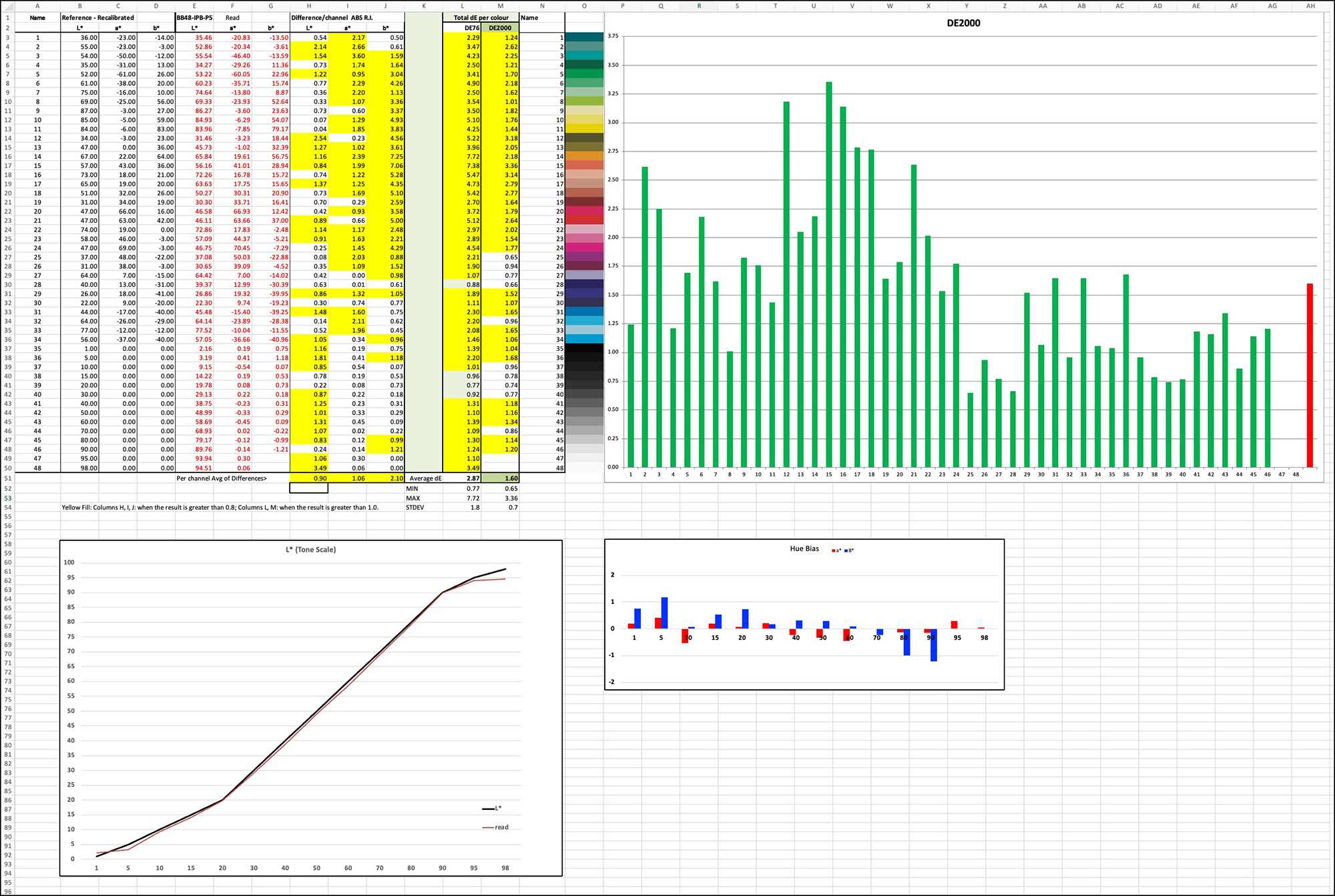
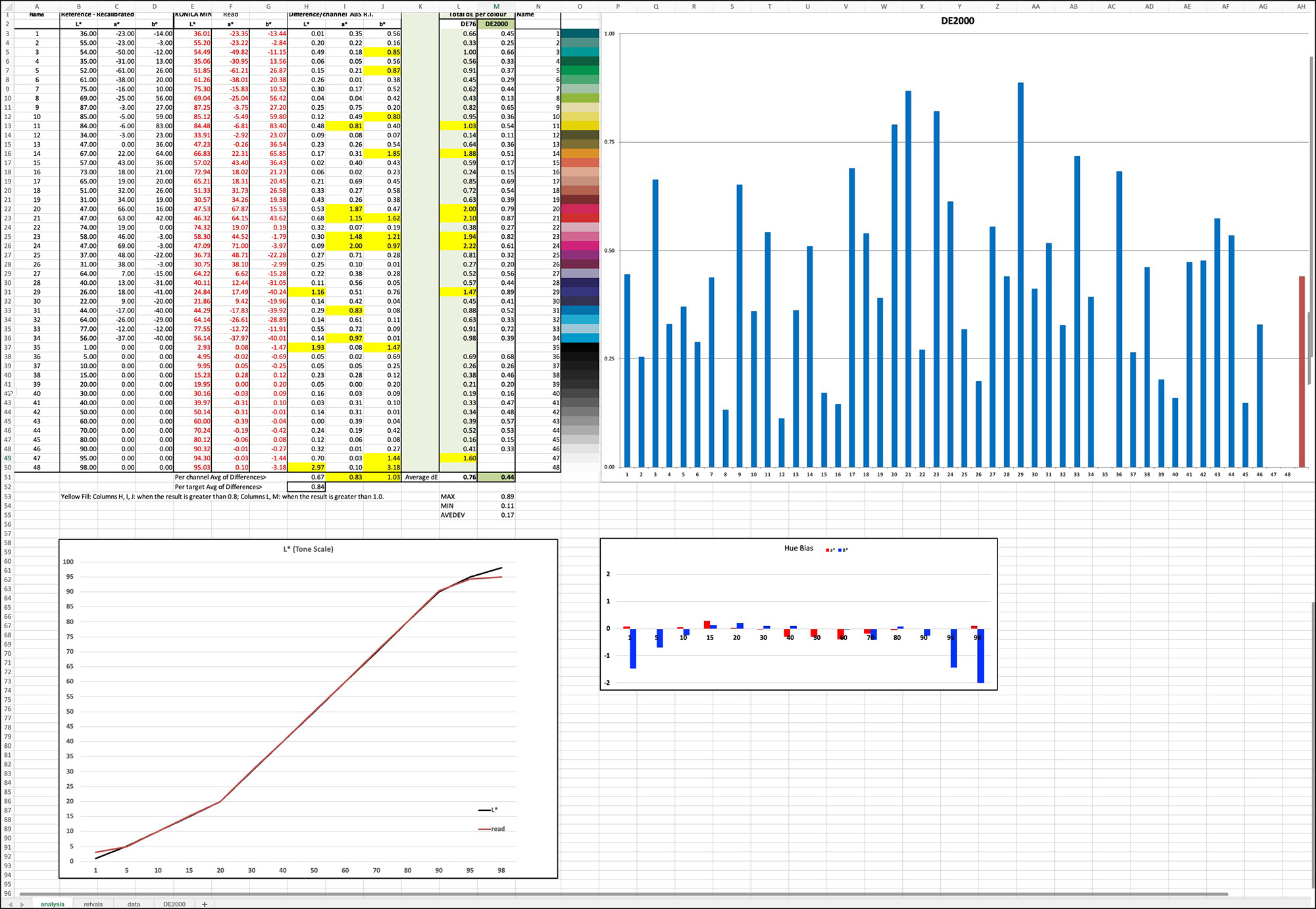
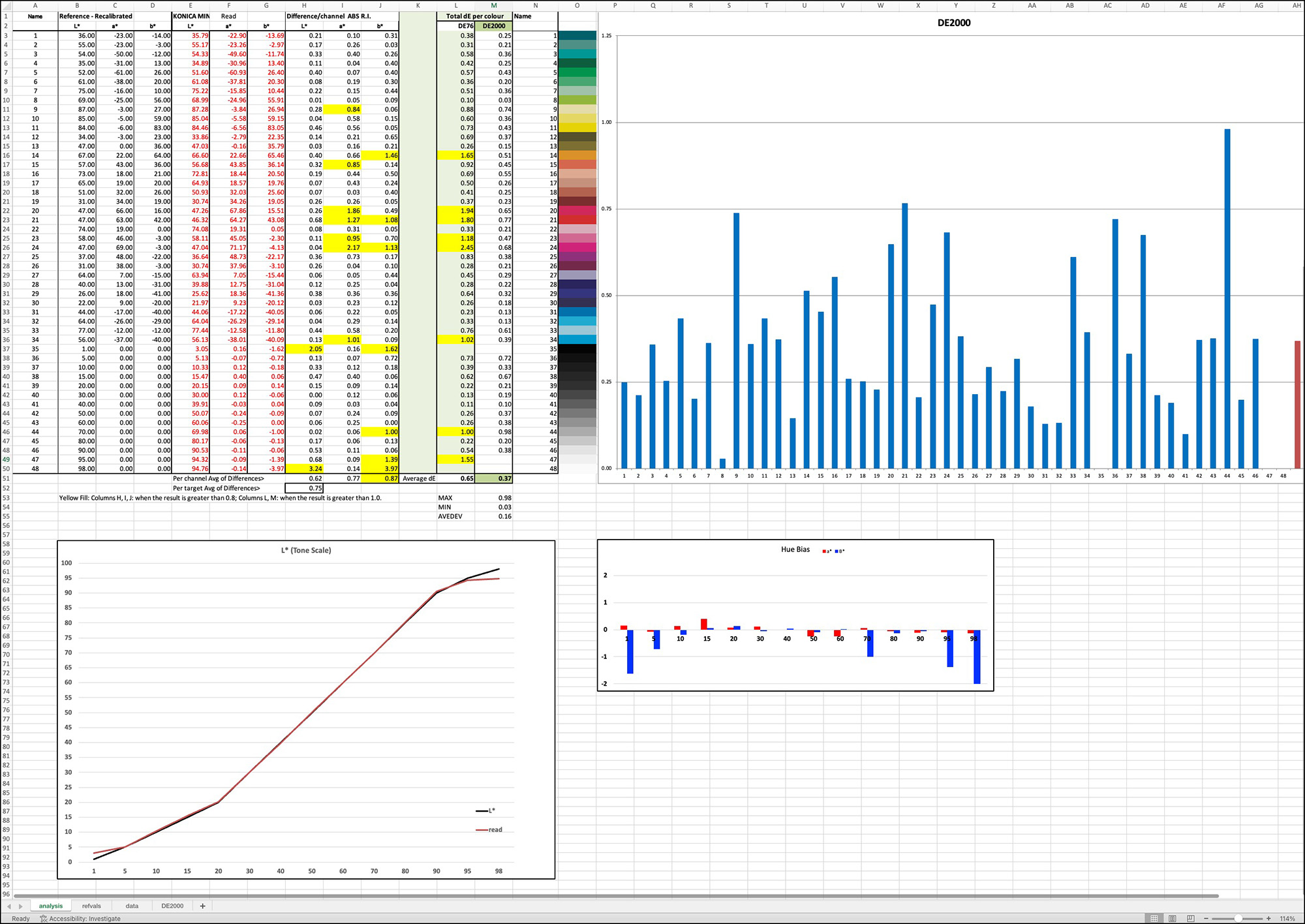
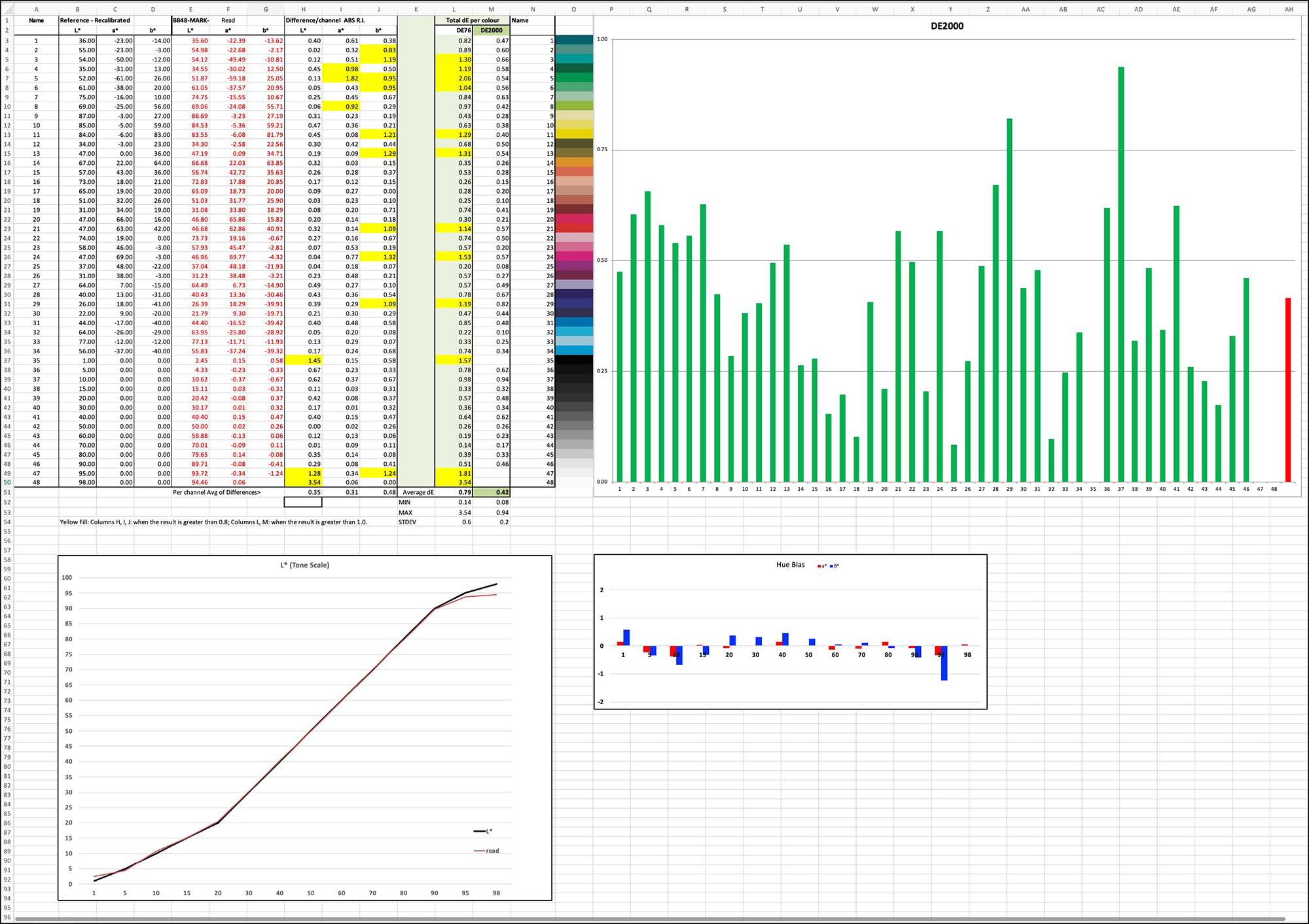
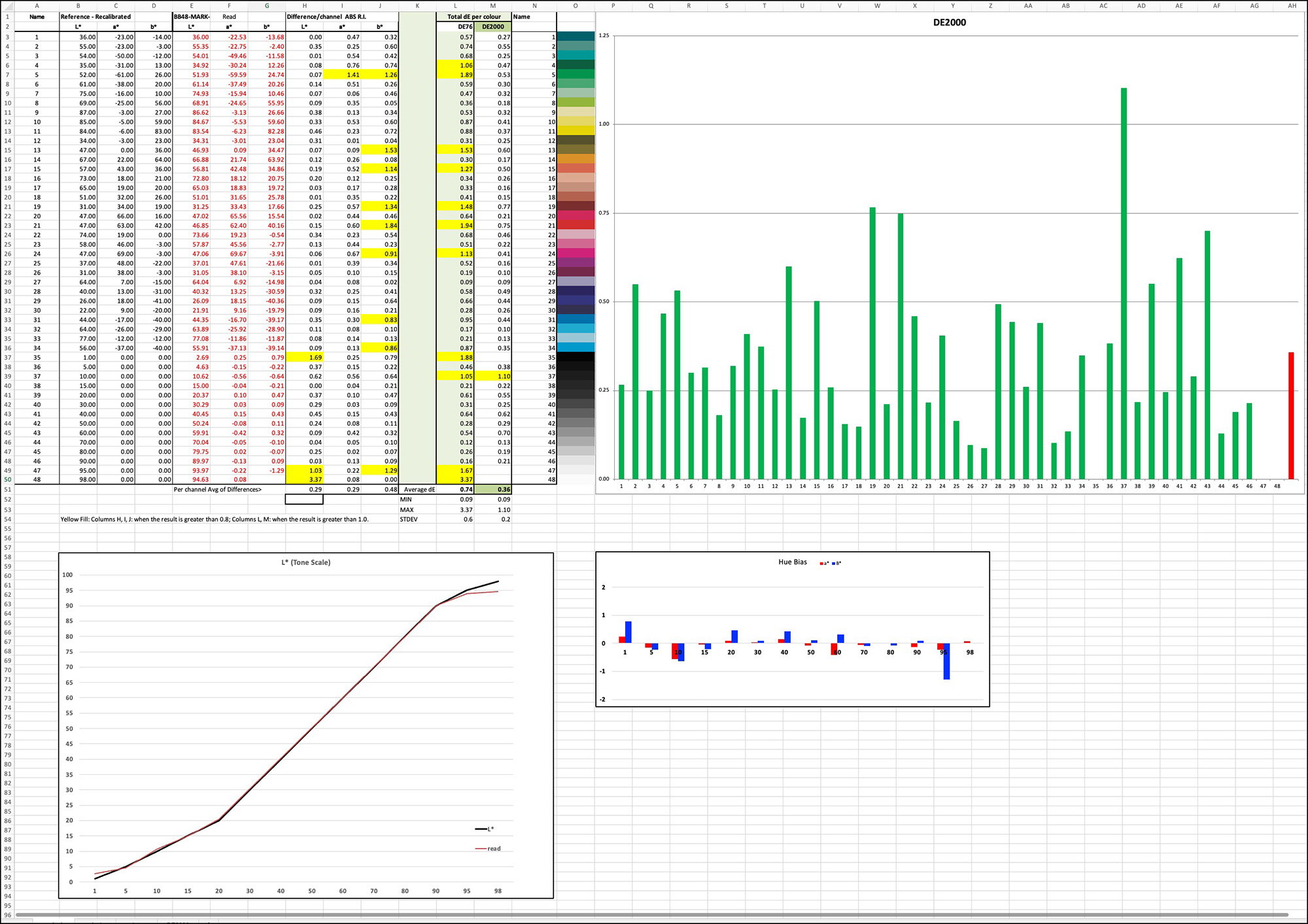
Guidance reading the charts:
Upper Left quadrant:
Ignore column L. It is for dE(76) which is no longer used.
Yellow highlighted results mean dE(2000) exceeds 1.0 in Column M or 0.8 in the other columns.
Columns A, B, C are the target file references values for each colour.
Columns D, E, F are the printed results for the same colours.
Columns H, I, J are the absolute differences between the two.
Column M are the dE(2000) results of interest, calculated from columns A to F in another tab.
Upper Right quadrant:
A graphic of the results from Column M.
Lower Left quadrant:
The black and red lines trace the file values and the result values respectively for the Lightness (L*) of the grayscale, which is patches 35 to 46 from Black to White. Patches 47 and 48 are out of gamut for this paper. The closer these lines converge the more accurate the outcome.
Lower Right Quadrant:
The hue neutrality of the gray scale.
0 on the Y-axis, is neutral (gray).
The X axis is for the Luminance point, starting at L*1, ending at L*98.
Red bars above or below 0 indicate a magenta or green tint (the a* axis), anything below +/- 1.0 being insignificant.
Blue bars above or below 0 indicate a yellow or blue temperature (the * axis), anything +/- 1.0 being insignificant.
Mark D Segal
Toronto, December 2025
Elevate Your Vision


Read this story and all the best stories on The Luminous Landscape
The author has made this story available to Luminous Landscape members only. Upgrade to get instant access to this story and other benefits available only to members.
Why choose us?
Luminous-Landscape is a membership site. Our website contains over 5300 articles on almost every topic, camera, lens and printer you can imagine. Our membership model is simple, just $2 a month ($24.00 USD a year). This $24 gains you access to a wealth of information including all our past and future video tutorials on such topics as Lightroom, Capture One, Printing, file management and dozens of interviews and travel videos.
- New Articles every few days
- All original content found nowhere else on the web
- No Pop Up Google Sense ads – Our advertisers are photo related
- Download/stream video to any device
- NEW videos monthly
- Top well-known photographer contributors
- Posts from industry leaders
- Speciality Photography Workshops
- Mobile device scalable
- Exclusive video interviews
- Special vendor offers for members
- Hands On Product reviews
- FREE – User Forum. One of the most read user forums on the internet
- Access to our community Buy and Sell pages; for members only.
You may also like