




There’s a moment every photographer knows. You’re deep into a long editing session, the screen is swimming slightly, your eyes feel sandpapered, and the image in front of you looks duller than it did two hours ago. So you push the saturation slider a little further. You’ll regret it tomorrow.
Your visual system is breaking down in real time.
In Article 1, we covered how the eye works – the ciliary muscle, rods and cones, dark adaptation, rhodopsin. Now let’s talk about what you can do about it. What exercises have real evidence behind them? What habits protect your vision across a career. And what the popular “natural vision improvement” programs get wrong.
*Note: This is not medical advice – we are putting the research out there to help us photographers understand our eyes.
What Eye Exercises Can and Cannot Do
Start here, because this is where most of the confusion lives.
Refractive errors are structural. Myopia happens when the eyeball is too long front to back, causing light to focus in front of the retina. Hyperopia is the reverse. Astigmatism comes from asymmetrical corneal curvature. These are physical dimensions – the shape and length of the eye itself. No exercise changes them.
Presbyopia is material aging. The crystalline lens stiffens over decades as new fiber cells compress the old ones. By your early 40s, the lens can’t round out fully when the ciliary muscle contracts. Exercises don’t reverse material aging.
Functional problems respond differently. The ciliary muscle can fatigue, spasm, and lose flexibility. The two eyes can lose coordination, creating strain during near work. The visual cortex can become more or less efficient at processing the signals the eyes send. These are functional – they respond to training and habits.
The rule: exercises work on muscles and neural processing. They work on corneal curvature, axial length, or lens stiffness only through the brain’s interpretation of what it receives – and we can train for that.
The Bates Method: Skip It
William Bates was an ophthalmologist who proposed in the early 1900s that refractive errors came from mental strain and extraocular muscle tension. His method – palming, sunning, shifting – claimed to cure myopia and other refractive errors through relaxation and visualization.
The American Academy of Ophthalmology reviewed the evidence and found no objective benefit. An independent analysis of 43 studies reached the same conclusion. Bates’s central anatomical claim – that external muscles change the eye’s shape to focus, rather than the internal ciliary muscle and lens – is wrong. Modern imaging has confirmed this.
The relaxation techniques in the Bates method do reduce subjective discomfort, which is why people report feeling better after palming. The eye is resting. The ciliary muscle gets a break. The refractive error stays unchanged.
One technique in the Bates method is dangerous: sunning, which involves exposing the eyes to direct sunlight. This causes thermal and photochemical retinal damage so don’t look directly at the sun!
What Works
The 20-20-20 Rule
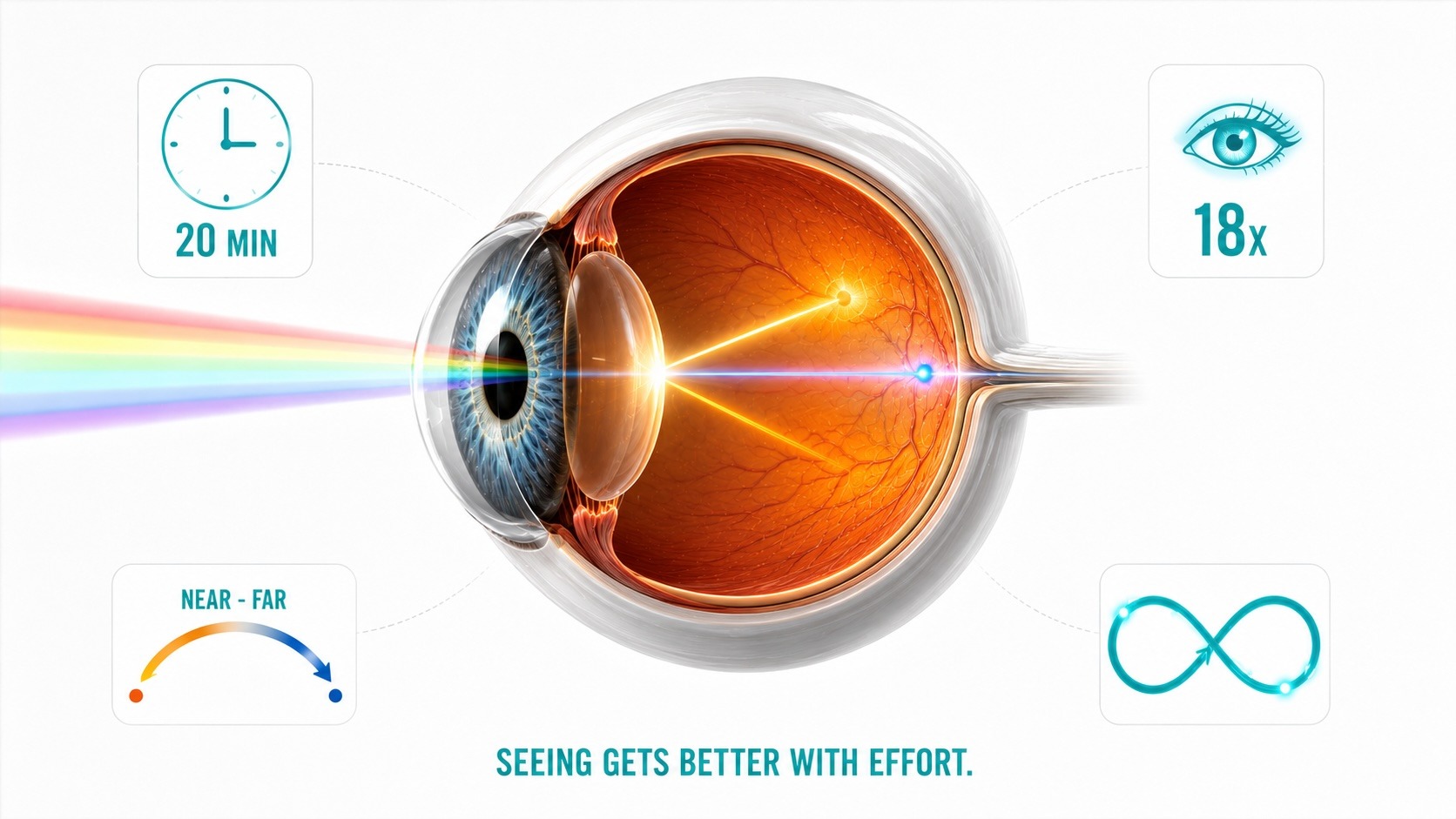
Every 20 minutes of near work, look at something 20 feet away for 20 seconds.
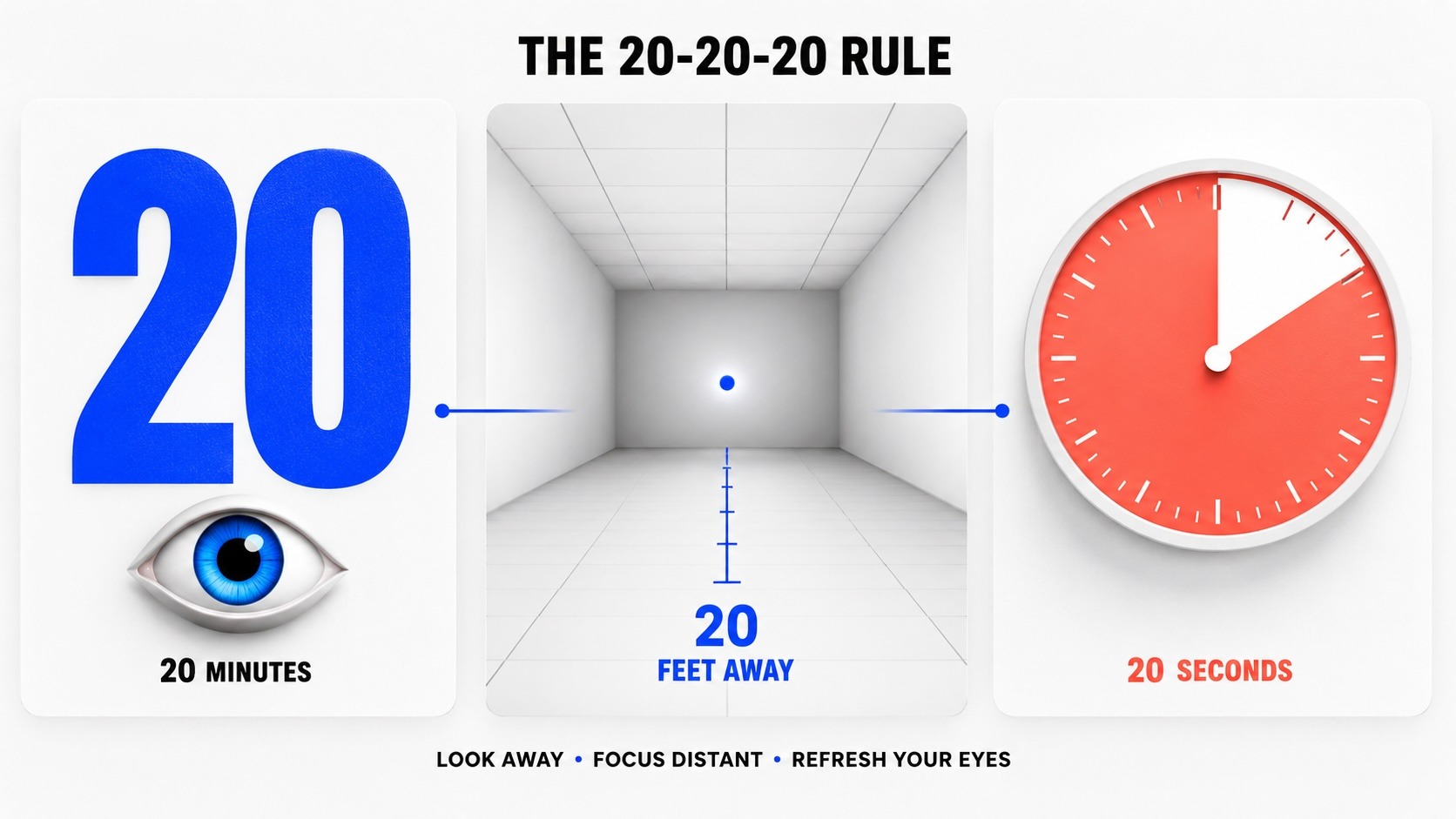
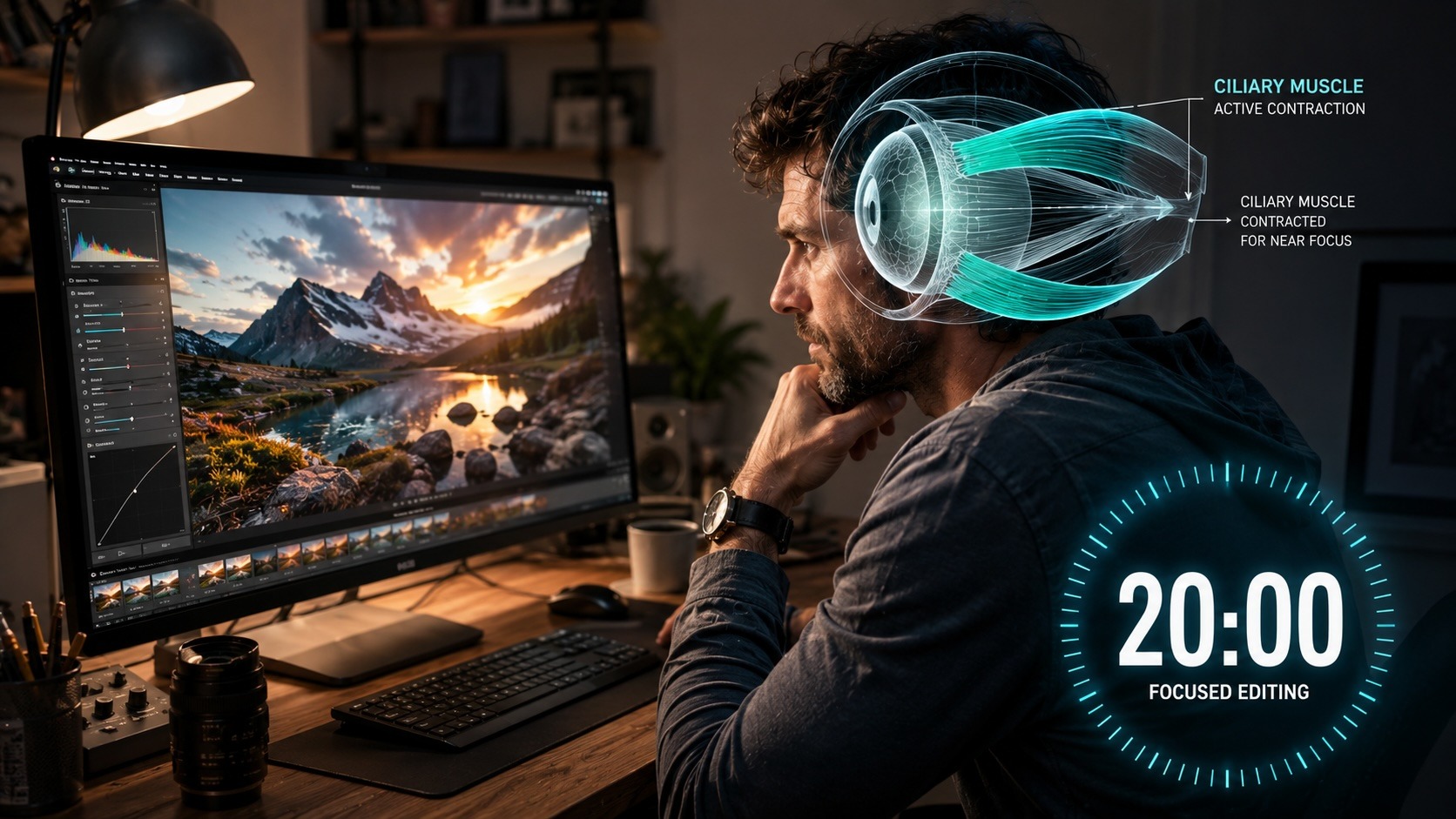
This is the most evidence-supported habit for managing digital eye strain. When staring at a screen with sustained near focus holds the ciliary muscle in a contracted state. Twenty seconds of distance focus releases that contraction, and lets the zonules pull the lens flat, and this breaks the accommodative spasm cycle before it builds.
The American Academy of Ophthalmology endorses it. Maybe set a timer. Try and do it every editing session.
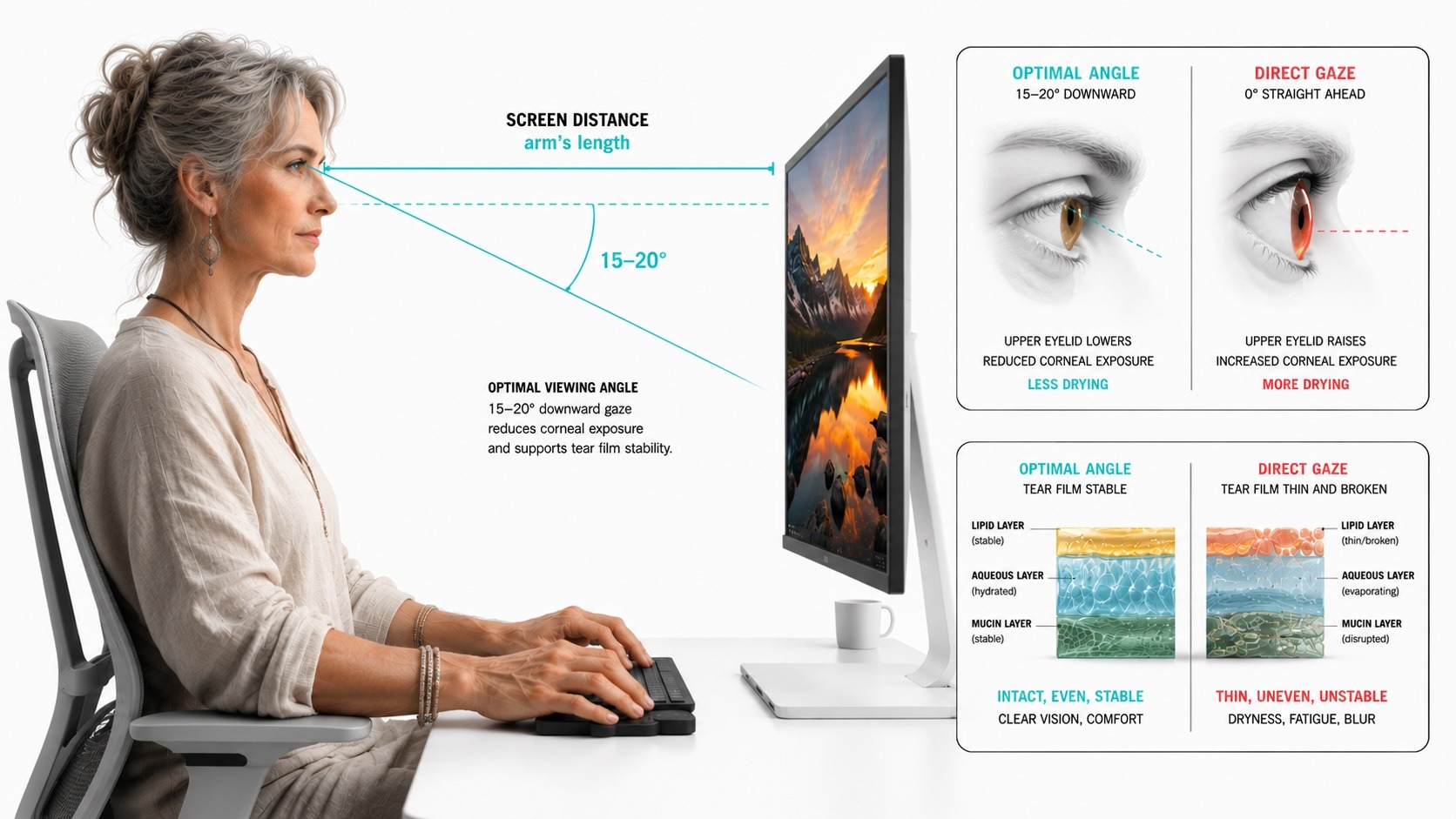
Screen ergonomics is something to consider as well. The screen should sit roughly an arm’s length away. The top of the monitor should be at or slightly below eye level, so you look down at roughly 15-20 degrees. This angle lets the upper eyelid drop slightly, reducing exposed corneal surface and slowing tear evaporation.
Tear Film
Tear film – as in tears, the fluid your eyes produce constantly, not a rip or cut – is the thin layered coating that covers the surface of the eye with every blink.
It’s more than just moisture. The tear film has three distinct layers: an outer lipid layer that slows evaporation, a middle aqueous layer that carries oxygen and nutrients to the cornea, and an inner mucin layer that helps the whole film spread evenly across the eye’s surface.
When it works well, tear film gives the cornea a smooth, optically precise surface. When it breaks down, light scatters before it even reaches the retina. Everything downstream – focus, contrast, color accuracy – suffers for it.
Conscious Blinking
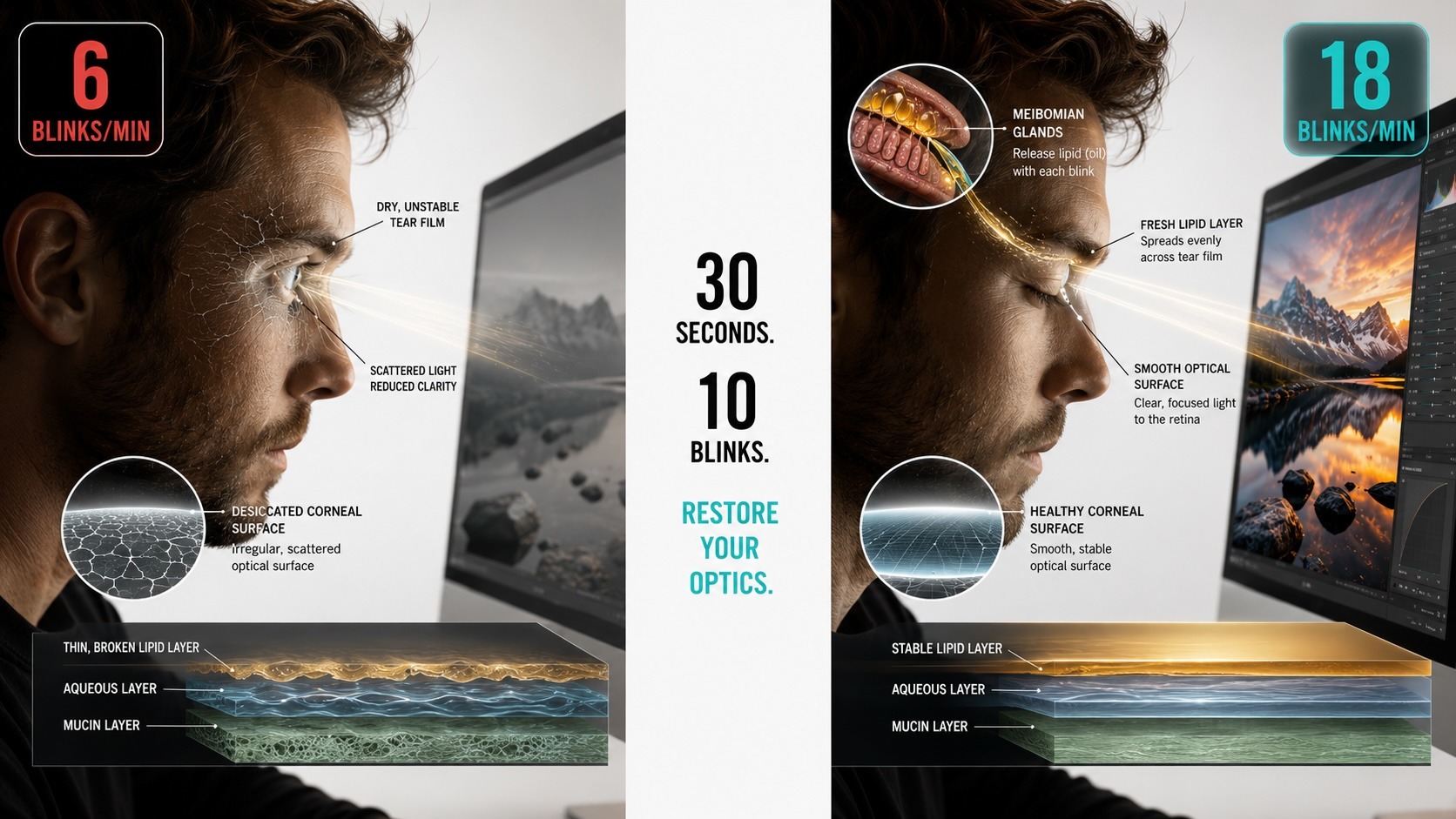
Under normal conditions, you blink 15-20 times per minute. During concentrated screen work – retouching, color grading, pixel-level editing – that blink rate drops to 50-70%, that’s 5-10 blinks per minute. Many of those blinks are incomplete, failing to fully cover the cornea.
Blinking pumps lipids from the meibomian glands along the eyelid margins, and spreads a fresh lipid layer across the tear film, and clears debris. A degraded tear film scatters light before it reaches the retina, reducing perceived contrast and sharpness. This is part of why images look flatter during long editing sessions – the optical surface of the eye is drying out.
Every 15 minutes, do 10 slow, deliberate blinks. Close fully, pause two seconds, open. It takes 30 seconds and measurably restores tear film quality.
Preservative-free artificial tears help when the environment is dry. Air-conditioned editing studios are hard on tear film.
Near-Far Focus Shifts
Hold a detailed target – a pen, a printed word, anything with fine detail – about 10 inches from your face. Focus on it for 15 seconds. Then shift focus to something 20 feet away and hold for 15 seconds. Repeat 5-10 cycles.
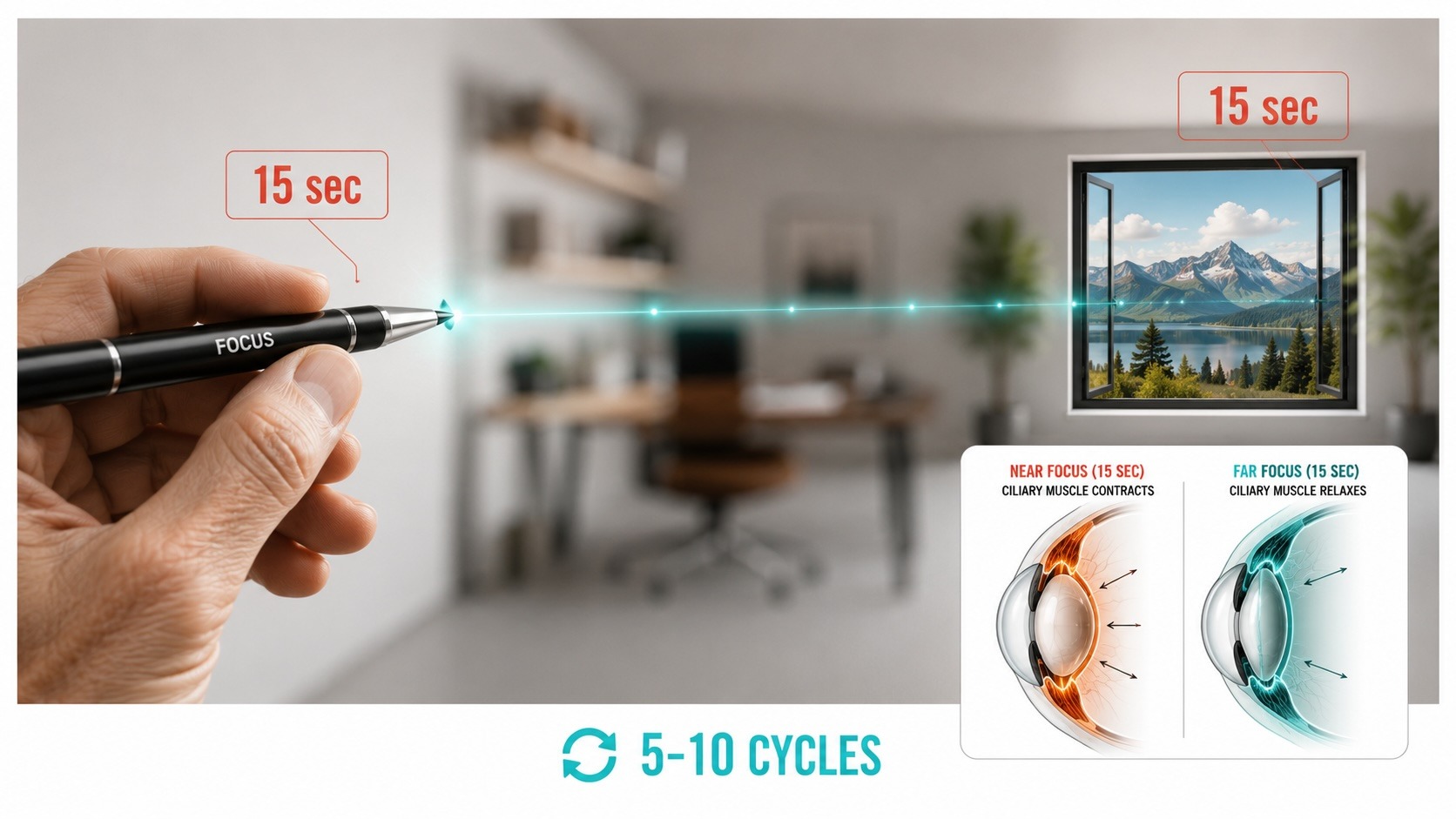
This exercises accommodative facility – the ciliary muscle’s ability to shift between contraction states. After sustained near work, the ciliary muscle can lock up, making distance focus sluggish. Near-far shifts keep it flexible.
Do this at the end of a long editing session before driving. The post-screen blur that makes driving feel slightly off is known as accommodative spasm. Doing Near-Far shifts with your eyes releases it.
Figure-Eight Tracking
Imagine a large figure-eight lying on its side on a wall about 10 feet away. Trace it slowly with your eyes for 30 seconds, then reverse direction. This moves the extraocular muscles through their full range of motion, releasing the static tension that builds from holding a fixed gaze – from looking at a viewfinder, or at a screen, or the scene you’re getting ready to capture.
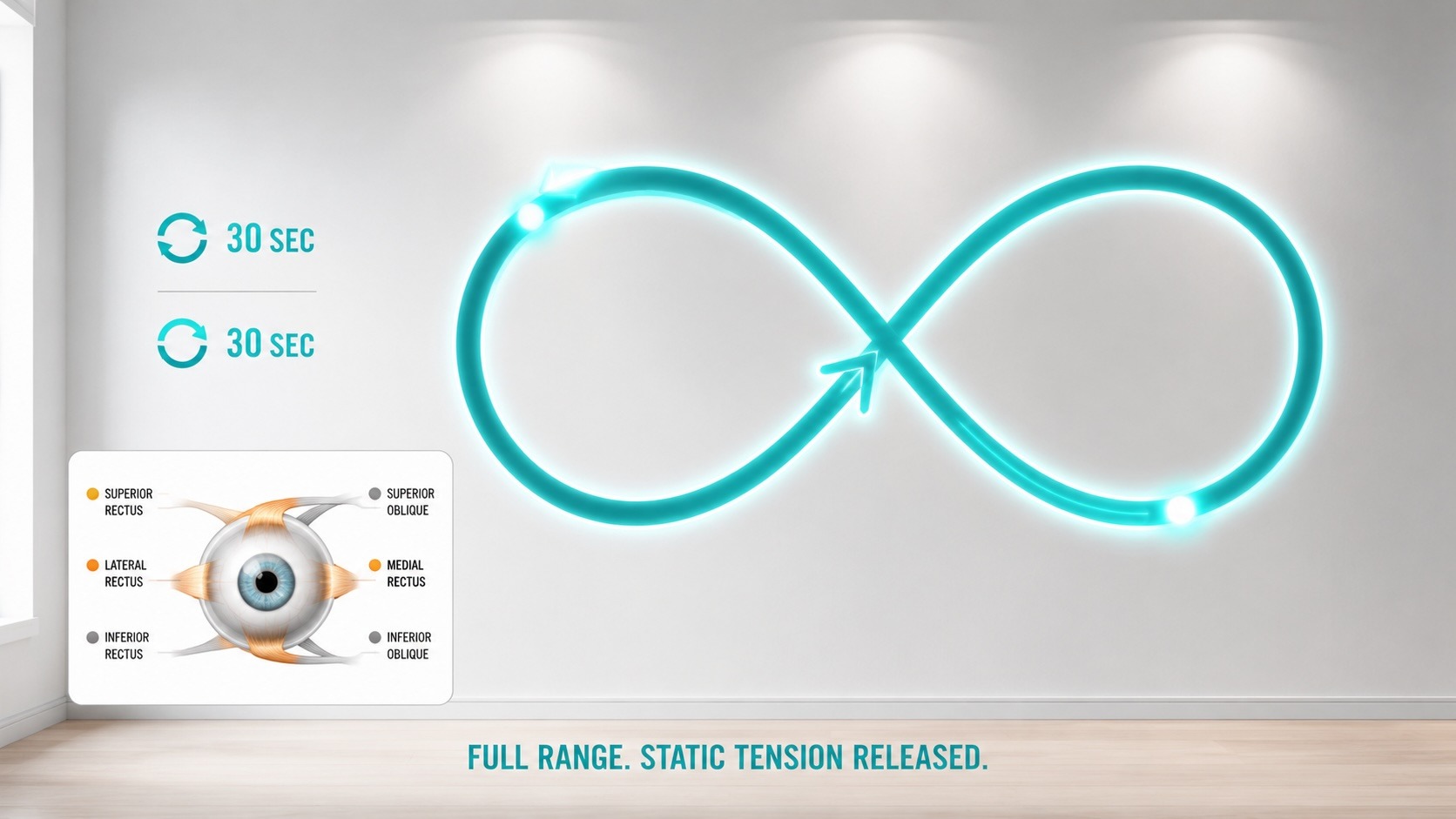
Two minutes of figure-eight tracking after a long editing session dissolves the muscular holding pattern that contributes to post-work headaches.
Diopter Calibration
Your camera’s viewfinder has a diopter adjustment wheel beside the eyepiece. It shifts the viewfinder’s focus point to account for your prescription. Set it wrong, and your ciliary muscle compensates on every shot, holding continuous accommodation to keep the viewfinder sharp. Over hours of shooting, that creates fatigue.
Most photographers set the diopter by looking at a scene through the viewfinder and turning the wheel until it looks sharp.
The problem: looking at a scene engages your ciliary muscle automatically, so you adjust the diopter to match your eye’s contracted state rather than its relaxed state.
Set the diopter this way instead:
- Put the lens cap on, or point the camera at a blank, bright surface – overcast sky or a white wall.
- Press the shutter halfway to activate the data overlay: gridlines, focus points, shutter speed, aperture.
- Let your gaze relax completely, as if staring at a distant horizon.
- Turn the diopter wheel until the data characters are sharp.
Now the viewfinder is calibrated to your relaxed eye. The ciliary muscle stays at rest during shooting. Check this calibration annually, or any time your prescription changes.
The Dark Adaptation Protocol
Full dark adaptation takes 20-40 minutes.
Rhodopsin – the rod photopigment that powers dim-light vision – bleaches rapidly in bright light and regenerates slowly in darkness. A single glance at a phone screen can cost you 5-10 minutes of hard-won adaptation.
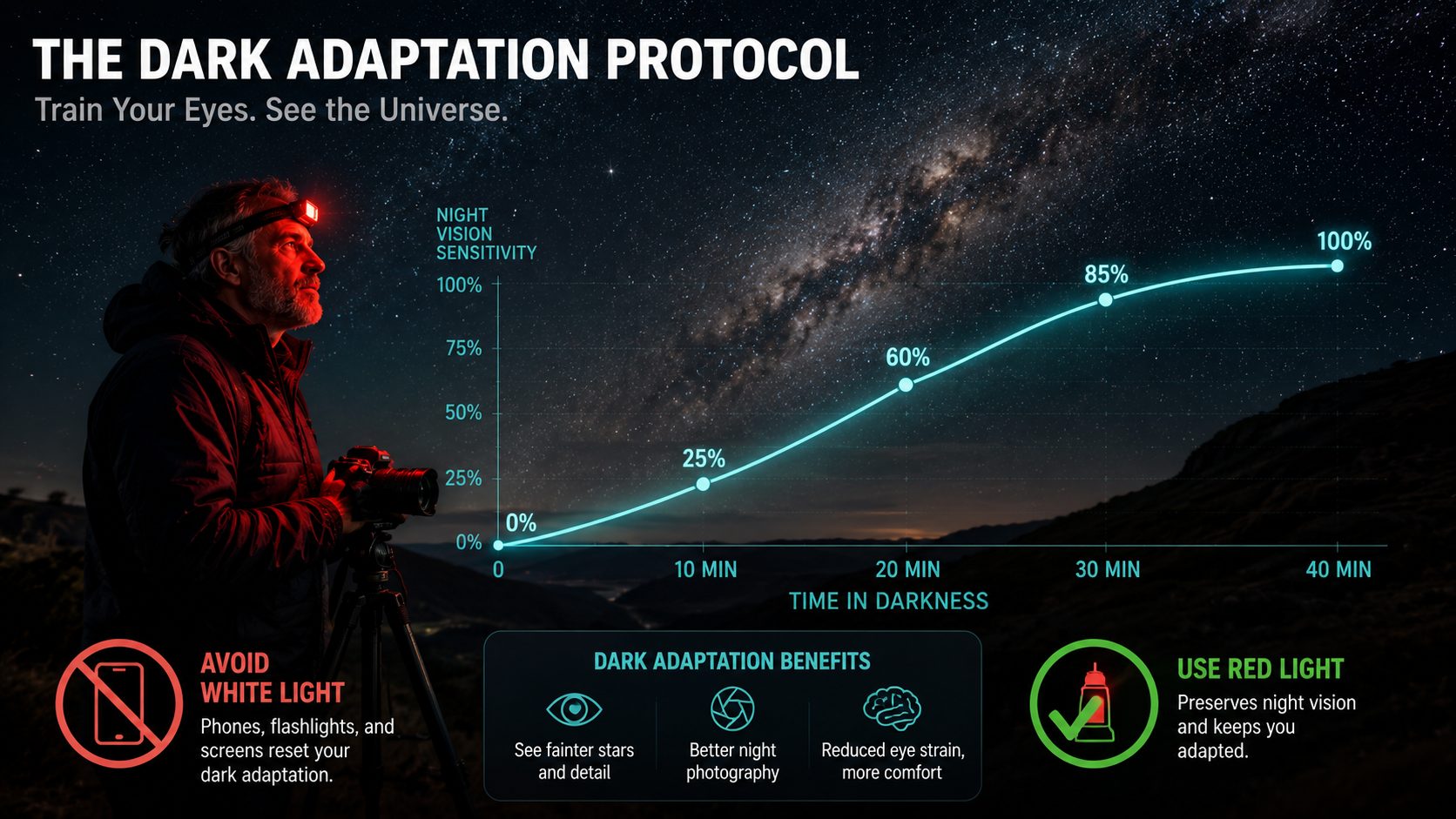
The protocol:
- Arrive at your location 30 minutes before you need full night vision.
- Use only dim red light. Rhodopsin is insensitive to wavelengths above 620nm. A red-filtered headlamp and a camera display set to red mode let you work without resetting your adaptation. Some manufacturers call it “Red” display mode, others call it night mode/display.
- When checking a faint subject – a dim star, a distant figure in low light – look slightly to the side rather than directly at it. The fovea has almost no rods. Looking 10-15 degrees off-center shifts the image onto rod-rich peripheral retina and should reveal details that disappear under direct gaze.
- Sunglasses during the day before a night shoot give your eyes a head start. Extended bright-light exposure before dark work slows adaptation.
The photographers who arrive early and stay off their phones have materially better night vision than those who pull up to a location, check their messages, and start shooting.
Screen Ergonomics and the Blue Light Question
Blue light has become the convenient explanation for screen fatigue. The reality is more specific.
A 2023 Cochrane systematic review analyzed 17 trials and concluded that blue-light-filtering lenses likely have little to no effect on eye strain symptoms. The AAO doesn’t recommend them for eye health.
Screen fatigue comes from sustained accommodation and reduced blinking. Both respond to the habits above.
One thing blue light does affect: circadian timing. Short-wavelength light suppresses melatonin and delays sleep onset. A tired, sleep-deprived visual system makes less accurate color and contrast judgments. Limiting bright screen use in the two hours before sleep helps sleep quality regardless of what you’re editing.
The Saturation Spiral – and How to Break It
As tear film degrades during long editing sessions, light scattering in the anterior eye increases. And – perceived image contrast drops. The scene will start to look flatter and less saturated than it did an hour ago. The photographer compensates – pushing saturation, increasing contrast, recovering shadows further than needed.
The next morning, with rested eyes and a restored tear film, those decisions look wrong. The images are over-processed. The color is harsh. The shadows are blocked.
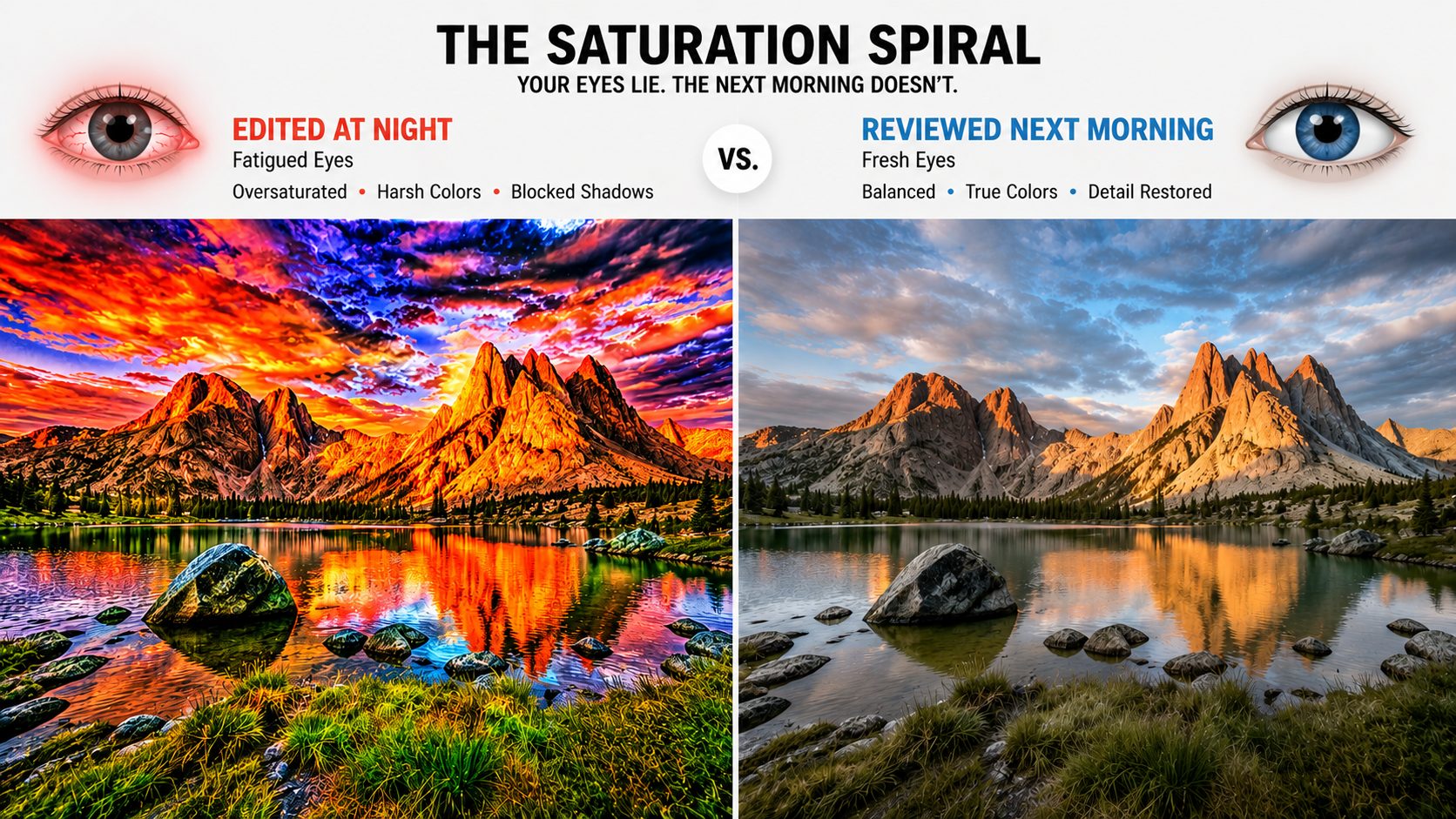
Break the spiral three ways:
- Take the 20-20-20 breaks. They restore accommodative comfort and blink rate.
- Calibrate your monitor and trust it. A properly profiled display gives you numbers that hold steady even when your eyes are shifting.
- Review key edits the following morning before exporting. Fresh eyes, fresh tear film. What looks right then is what you intended all along.
What Warrants Professional Evaluation
Some things habits and exercises don’t address. See an optometrist or ophthalmologist if:
- Eye strain persists through 20-20-20 breaks and good ergonomics. This may indicate convergence insufficiency or accommodative dysfunction – both treatable with office-based vision therapy. The Convergence Insufficiency Treatment Trial, a large multicenter randomized trial, found supervised vision therapy normalized binocular function in roughly 75% of patients – significantly better than home exercises alone.
- Distance vision goes blurry after screen work and takes more than a few minutes to clear. That’s an accommodative spasm, diagnosed by cycloplegic refraction and managed with targeted therapy.
- Your prescription hasn’t been updated in more than two years. An outdated prescription forces constant compensatory accommodation – quietly draining your visual system all day.
And the red flags from Article 1 bear repeating: sudden new floaters, flashes of light, a curtain across your vision, or sudden vision loss require same-day emergency evaluation. These are usually painless. Act on the visual symptoms alone.
*Note: This is not medical advice. We are putting the research out there to help us photographers.
A Daily Practice
These habits, assembled into a routine, take less than five minutes spread across a day:
- Before shooting: Set your diopter correctly. Do a quick near-far focus shift.
- During editing: 20-20-20, every session. Ten deliberate blinks every 15 minutes. Preservative-free tears if the environment is dry.
- After long screen sessions: Near-far focus shifts, figure-eight tracking. Two minutes.
- Before night shoots: 30 minutes of darkness. Red light only. Leave the phone alone.
- The next morning: Final review of key edits before exporting.
The eye responds to how you treat it – session to session, year to year. Hopefully, this helps us understand a little better how to protect our vision and to make better images, to help OUR visual system working at full capacity to make the decisions.
Article 3 looks at something deeper – the difference between seeing clearly and seeing well. How photographers process scenes differently from everyone else, what inattentional blindness costs you, and how to train the part of vision that lives in the brain.
Sources and References:
Bates Method
- Bates Method – Wikipedia (with citations to primary skeptical reviews) https://en.wikipedia.org/wiki/Bates_method
- Bates Method – Vivid Vision https://www.seevividly.com/info/Physiology_of_Vision/The_Eyes/Bates_Method
- Vision Training Not Proven to Make Vision Sharper – American Academy of Ophthalmology https://www.aao.org/eye-health/tips-prevention/vision-training-not-proven-to-make-vision-sharper
- A Systematic Review of the Applicability and Efficacy of Eye Exercises http://cinotes.s3.amazonaws.com/flipped+classroom+articles/Advanced+Eye+Movements+/Eye+Therapy+Rehab/A+Systematic+Review+of+the+Applicability+and+Efficacy+of+Eye+Exercises.pdf
Convergence Insufficiency & Vision Therapy (CITT Trial)
- Scheiman M, et al. “A Randomized Clinical Trial of Treatments for Convergence Insufficiency in Children.” Archives of Ophthalmology, 2008. Search PubMed: Scheiman convergence insufficiency treatment trial 2008 https://pubmed.ncbi.nlm.nih.gov/18852411/
- Vision Therapy – Wikipedia https://en.wikipedia.org/wiki/Vision_therapy
- Vision Therapy for Athletes – Cook Vision Therapy https://www.cookvisiontherapy.com/vision-therapy-for-athletes-improving-sports-performance/
- Vision Therapy Exercises You Can Try at Home – Art of Optiks https://artofoptiks.com/eyewear/2025/03/vision-therapy-exercises-you-can-try-at-home
- Eye Exercises You Can Do at Home – Optometrists.org https://www.optometrists.org/vision-therapy/guide-to-vision-therapy/eye-exercises-you-can-do-at-home/
Blue Light & Cochrane Review
- Singh S, et al. “Blue-light filtering spectacle lenses for visual performance, sleep, and macular health in adults.” Cochrane Database of Systematic Reviews, 2023. Search: Cochrane blue light filtering lenses 2023 Singh https://www.cochranelibrary.com (search “blue light filtering lenses”)
Digital Eye Strain & Blinking
- Digital Eye Strain: A Comprehensive Review – PMC, NIH https://pmc.ncbi.nlm.nih.gov/articles/PMC9434525/
- Computer Vision Syndrome – American Optometric Association https://www.aoa.org/healthy-eyes/eye-and-vision-conditions/computer-vision-syndrome
- Computer Vision Syndrome – Netram Eye Foundation https://netrameyefoundation.com/conditions/computer-vision-syndrome
Diopter & Viewfinder Ergonomics
- Adjusting Your Diopter for Optimal Performance – Photofocus https://photofocus.com/photography/adjusting-your-diopter-for-optimal-performance/
- Diopter Adjustment Errors: Hidden Risks – Chrosziel https://www.chrosziel.com/diopter-adjustment-errors-hidden-risks-for-accuracy-and-safety/
Brock String & Convergence Exercises
- Orthoptic Eye Exercises – Royal Berkshire NHS https://www.royalberkshire.nhs.uk/media/grxgobmj/orthoptic-eye-exercises_mar25.pdf
- Orthoptic Exercises – University Hospitals Dorset NHS https://www.uhd.nhs.uk/uploads/about/docs/our_publications/patient_information_leaflets/Eye_Department/Orthoptic-exercises.pdf
- 7 Eye Exercises for Accommodative Disorders – Wilmington Family Eye Care https://wilmingtonfamilyeyecare.com/7-eye-exercises-for-accomodative-disorders-part-4-of-the-vt-series/
General Eye Exercise Reviews
- Eye Exercises to Improve Sight – Is There Any Science Behind Them? – UMass Medical https://www.umassmed.edu/news/articles/archives/2024/06/eye-exercises-to-improve-sightis-there-any-science-behind-them/
- 8 Easy Eye Exercises to Improve Vision – Kraff Eye Institute https://kraffeye.com/blog/8-easy-eye-exercises-to-improve-vision-techniques-and-tips





Elevate Your Vision


Read this story and all the best stories on The Luminous Landscape
The author has made this story available to Luminous Landscape members only. Upgrade to get instant access to this story and other benefits available only to members.
Why choose us?
Luminous-Landscape is a membership site. Our website contains over 5300 articles on almost every topic, camera, lens and printer you can imagine. Our membership model is simple, just $2 a month ($24.00 USD a year). This $24 gains you access to a wealth of information including all our past and future video tutorials on such topics as Lightroom, Capture One, Printing, file management and dozens of interviews and travel videos.
- New Articles every few days
- All original content found nowhere else on the web
- No Pop Up Google Sense ads – Our advertisers are photo related
- Download/stream video to any device
- NEW videos monthly
- Top well-known photographer contributors
- Posts from industry leaders
- Speciality Photography Workshops
- Mobile device scalable
- Exclusive video interviews
- Special vendor offers for members
- Hands On Product reviews
- FREE – User Forum. One of the most read user forums on the internet
- Access to our community Buy and Sell pages; for members only.
You may also like